


- 출시일
- 2015년 11월 18일
- 채널
- 안정
- 테스트된 WordPress 버전
- 4.3.1
WPML 3.3 makes it easy to create multilingual WordPress sites that don’t have English as their ‘original language’, or don’t even have English at all.
As of WPML 3.3, each string has its own source language and you can easily set the language of individual strings, or entire contexts.
Let’s look at a practical example. Supposing that your site runs in Spanish (default), Catalan and French. No English. Your theme and plugins are coded with English, as their original language.
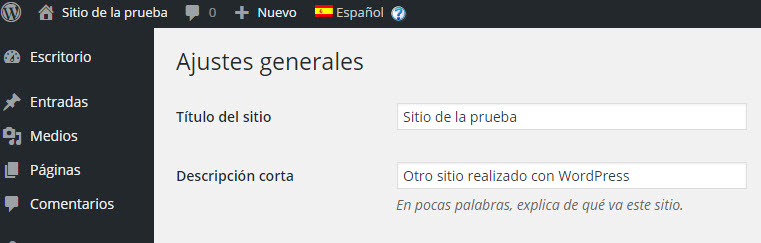
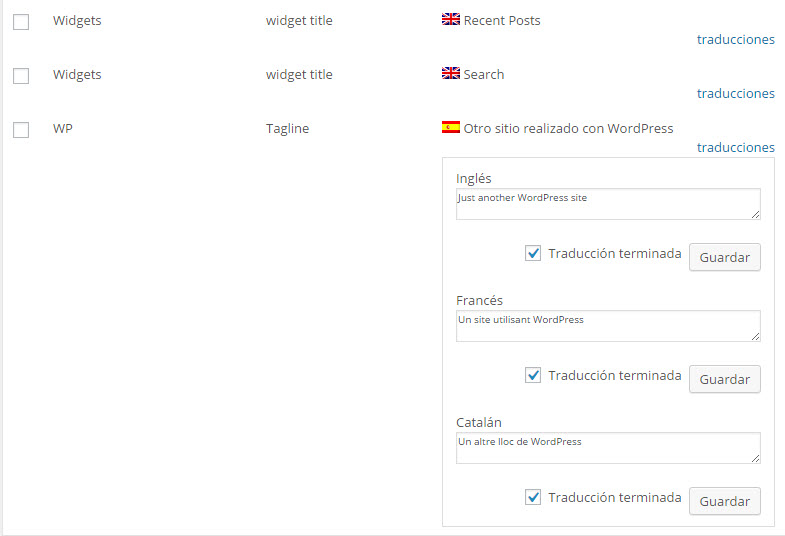
In this example, you will want to translate the texts in the theme from English to Spanish, Catalan and French. You will want to enter the site’s tagline and widgets in Spanish and translate them to Catalan and French. You certainly don’t want to go through English.
| Enter texts in your normal language | Translate to the site’s other languages in String Translation |
|---|---|
 |
 |
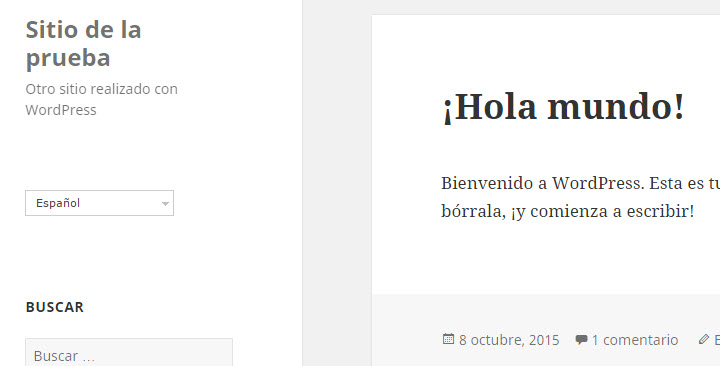
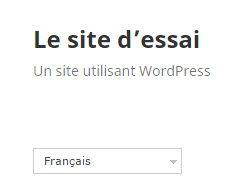
| The Spanish homepage (original language) | The French homepage (translation) |
|---|---|
 |
 |
With this update to WPML, you can do just this. WPML assumes that any texts coming from WordPress, the theme or plugins is in English. Even if your site doesn’t have English, you will still see English as the source language of these strings and you can translate to all of your site’s languages.
WPML will also assume that any texts that you enter in the WordPress admin will be in the site’s default language. You will be able to translate these texts to the other languages in the site, without going through English.
How to set the source languages of strings
You can change the languages of specific strings or all strings that belong to a domain.
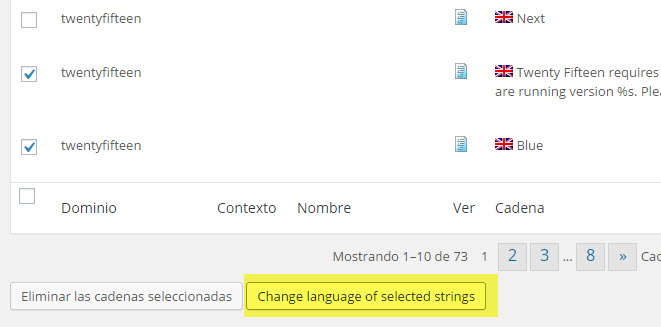
To change the language of specific strings, select them and click on the new Change language of selected strings button. Then, select the new language.
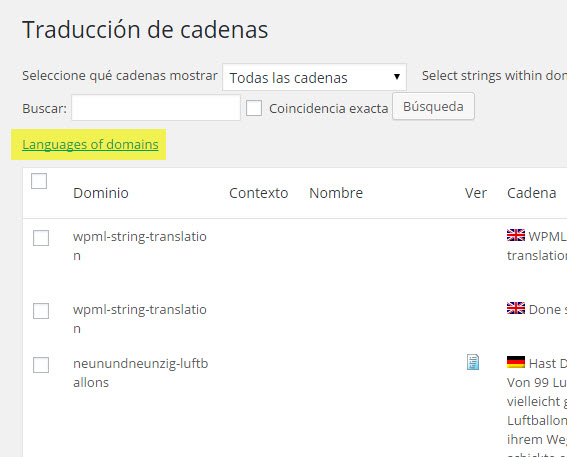
You can also change the language of entire contexts. This is useful when you get a theme or a plugin, that’s coded in a language other than English. Click on the new link, at the top of the String Translation page, Language of domains.
Then, choose the new language.
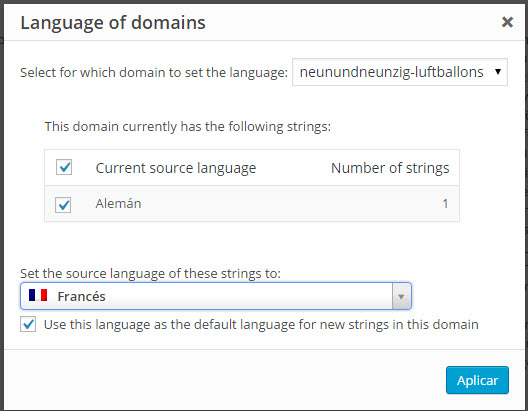
The dialog will show you a table of the strings in that domain. You can choose the new language and also make it the default language for new strings that will be added to that domain.
Existing sites remain unchanged (unless you want to change strings)
Existing sites are not affected by this change. Since you HAD to write texts in English before in the WordPress admin, when you update to the new version of WPML, WPML will know that existing admin strings are in English. If you want, you can now change their language and enter them again in your site’s default language. However, this change is entirely up to you. If you don’t want to go through the hassle, you don’t have to.
To update the string languages of existing sites, follow the same as shown before. You can update individual strings or entire contexts.
Major improvements to professional translation interface
WPML 3.3 greatly improves the way we work with translation services. Thanks to the accumulated experience of working with production sites with the new translation interface, we have noticed a number of issues and handled them. There were corner cases related to deleting content in WordPress, cancelling jobs on the translation service and all sorts of scenarios that happen, but were not handled.
We’ve also changed the translation pickup for sites that receive translations manually. The UI looks the same, but the actual translation pickup runs in small batches. This means that no matter how many translations you collect, the server and browser should not time out.
Fixes and improvements in WPML 3.3
We are finally reaching good unit and integration test coverage for WPML. These tests have helped reveal a number of glitches, that we are very happy to resolve:
- Resolved dependency on of trid on browser referrer
- Fixed issue with duplicated posts reverting to scheduled state with missed schedule status
- Removed obsolete setting “Add links to the original content with rel=”canonical” attributes.”
- Resolved PHP Notice: bbp_setup_current_user was called incorrectly.
- Incorrect .htaccess when using a directory for the default language
- Categories to navigation menu can be now added when WPML is active
- Fixed incosisten behavior with hierarchical post types using the same slug
- Setting a menu language switcher as “horizontal” now allows to set it back to “dropdown”
- Fixes compatibility issues with languages switcher and 2015 theme
- Removed asynchronous AJAX requests
- Terms count are properly updated when setting a post a private
- Fixed compatibility issues with Views
- Removed dependency of ST with TM, causing a Call to undefined function object_to_array() fatal error
- Fixed database errors when showing pages list and there are no taxonomies associated with the pages post type
- The WPML language selector properly shows language names in the right language
- Fixed random DB Errors & maximum execution time errors when upgrading to WPML 3.3
- SitePress::pre_option_page properly caches data
- Password-protected posts and private status are properly copied to translations, when this setting is enabled
- Fixed the “Display hidden languages” options for users
- Fixed redirection for child pages
- Fixed issue with menu theme location being lost after updating another menu item
- Administrator language switcher will be only added after installation is completed
- Fixes the issue of WPML_Root_Page class not being included in some cases
- Fixes the issue of errors in the communication with ICL leading to a white-screen
- get_term_children results will be consistent when there is an element with the same id in icl_translations
- The “Translate Independently” button now work when autosave is off
- Resolved conflict with Avada theme and root page
- Fix so that taxonomies can have a custom language template for the default language
- Filter url for scripts and styles when language is per domain
- Fixed an issue causing a notice and incorrect results for certain taxonomy queries that involved custom post types
- Resolved notice “Undefined index: strings_language” after WPML activation and configuration
- Fixes issue with password-protected posts in different domains per language configurations
- Resolved notice “Undefined index: strings_language” after WPML activation
- Resolved http(s) protocol and different domains per language issues
- Resolved broken settings issue with WooCommerce during WPML activation
- Resolved notices when selecting “All languages” in admin
- Removed Translation Management dependency when duplicated posts are updated
- Resolved issues when deleting a Layout which has no cells (hence no package)
- Fix synchronizing post private state
- Fix so that Gravity Forms with a large amount of fields can be send to translation
- Fix translation of taxonomy labels when original is not in English
- Adjust the current language if it’s different from the language of the menu in the get param
- Fixed issue with comments not being shown on back-end in multisites using WooCommerce
- Fixed issue with javascript browser redirection happening even in default language
- Don’t show the taxonomy language switcher on the taxonomy edit page
- Resolves database error when adding new sites in network installations
- Fixed issue with bbPress and WPML configuration in network installations
- Other minor bug fixes
Other improvements
- Introduced internationalisation API for wp_mail() – needed to complete multilingual support for the WooCommerce Sensei extension
- Data transfer between domains (when using languages in domains): needed with WooCommerce, and in preparation for other upcoming features
- Added button to to clear all WPML caches
- WPML now allows to load a taxonomy template by language, also for the default language
- Added ‘blog_translators’ filter to programmatically change the list of translators
- Improved browser redirect performances
- Fixed performance issues when lists posts (in particular, but not only, WooCommerce products)
업데이트 또는 다운로드
이 업데이트는 구독이 활성화된 모든 WPML 고객사가 사용할 수 있으며, 릴리스 후 24시간 이내에 WordPress 관리 화면의 플러그인 페이지에 표시됩니다. 플러그인 → 새로 추가 → 상용에서 즉시 확인할 수도 있습니다. 수동으로 다운로드하여 설치하려면 wpml.org 계정의 다운로드로 이동하고(설치 지침 참조), 버전을 섞지 말고 모든 구성 요소를 함께 업데이트해야 합니다.
도움이 필요하거나 피드백을 제공하고 싶으십니까? 기술 지원 포럼을 이용해 주세요.