


- Status
- Resolved by author
- Resolved in
- All-in-One WP Migration version 7.105
- Related plugin/theme
- All-in-One WP Migration
- Topic tags
- Compatibility
Overview of the issue
When using All-in-One WP Migration with WPML, you might experience a WordPress database error after completing a site migration. As a result, the Advanced Translation Editor may fail to open and redirect you to the Translations Queue instead.
WordPress database error Unknown column 'uuid' in 'field list' for query INSERT INTO `wp_icl_translation_status` ...
Workaround
Please, make sure of having a full site backup of your site before proceeding.
- Open your site database using phpMyAdmin or your preferred database management tool
- Locate the
wp_icl_translation_statustable (thewp_prefix might be different on your site) - Check whether the
uuidcolumn is missing and a column namedCHAR(36)exists instead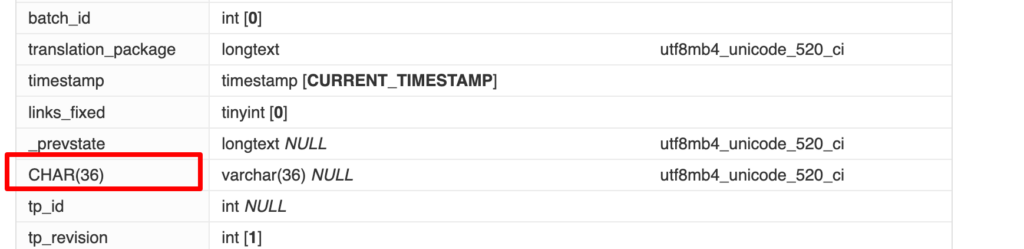
- Rename the
CHAR(36)column touuid - Save the change