


- Status
- Resolved
- Reported for
- WPML Multilingual & Multicurrency for WooCommerce 4.11.7
- Resolved in
- 4.12.0
Overview of the issue
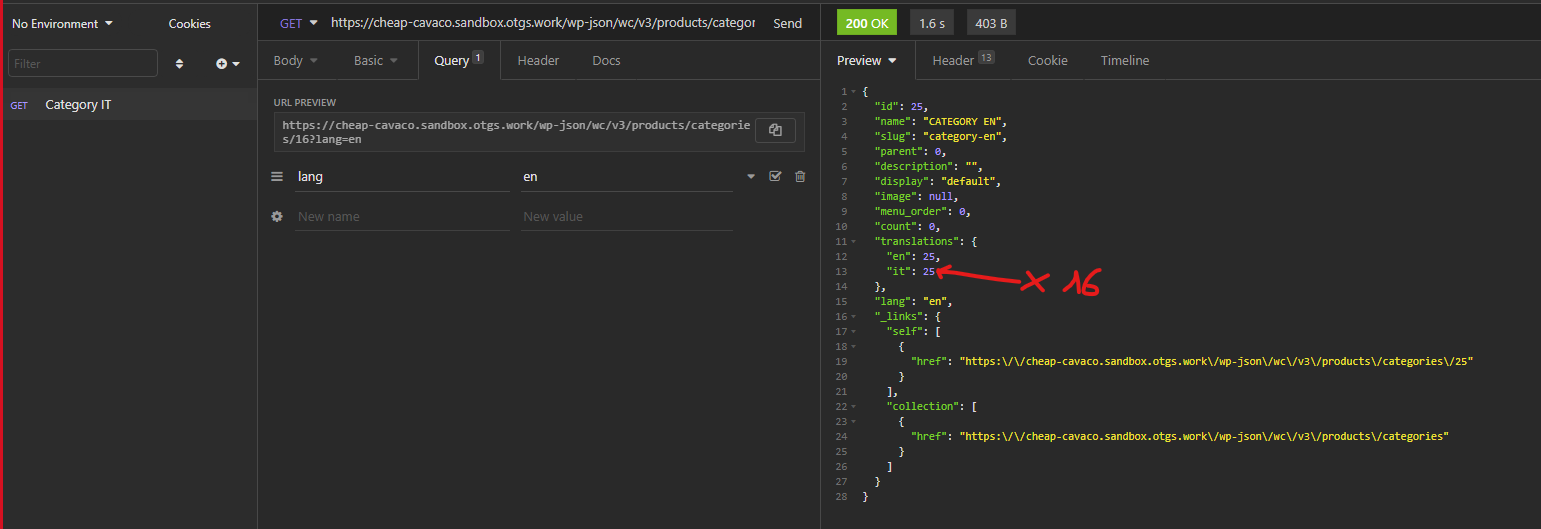
When you access a taxonomy using the REST API, it displays the wrong ID.
Workaround
While we are working on a permanent fix you can try the following workaround:
- Before proceeding, please make a full backup of your site
- Edit /woocommerce-multilingual/classes/Rest/Wrapper/ProductTerms.php line 75
- Replace the following code:
			$response->data['translations'] = Fns::map(
				$getTermId,
				$this->wpmlTermTranslations->get_element_translations( $termTaxonomyId, $trid )
			);
- With
			remove_filter( 'terms_clauses', [ $this->sitepress, 'terms_clauses' ], 10 );
			remove_filter( 'get_term', [ $this->sitepress, 'get_term_adjust_id' ], 1 );
			$response->data['translations'] = Fns::map(
				$getTermId,
				$this->wpmlTermTranslations->get_element_translations( $termTaxonomyId, $trid )
			);
			add_filter( 'terms_clauses', [ $this->sitepress, 'terms_clauses' ], 10, 3 );
			add_filter( 'get_term', [ $this->sitepress, 'get_term_adjust_id' ], 1 );