


- 상태
- 해결됨
- 보고된 제품
- WPML Multilingual CMS 3.3.6
문제 개요
Repeater 애드온은 다른 필드 유형을 포함하도록 설계된 리피터 필드 유형을 제공합니다. 사용자가 리피터 내의 콘텐츠를 복제하려면 임시 해결 방법 섹션에 설명된 대로 스니펫을 추가하고 필드 이름을 주의해서 추가해야 합니다.
이 문제는 현재 다음 필드 유형에서 발생합니다:
- 이미지
- 파일
- 갤러리
- 택소노미
- 글 개체
- 페이지 링크
참고: 다른 모든 필드 유형에도 제공된 코드 스니펫을 사용할 수 있습니다. 유일한 차이점은 필드의 이름입니다. 즉, 이 스니펫을 사용하여 리피터 및 일반 필드 유형 모두의 복제 문제를 해결할 수 있습니다.
이러한 필드 유형에 대한 알려진 문제는 여기에서 확인할 수 있습니다.
임시 해결 방법
복제가 제대로 작동하도록 functions.php 파일에 이 스니펫을 사용할 수 있습니다.
function wpml_fix_acf_duplication( $value_to_filter, $target_language, $meta_data ) {
  // Field names should be placed into following array.
  $fields = array(
     'taxonomy_field' => 'some_taxonomy_name',
     'repeater_field_0_repeater_taxonomy_field' => 'some_other_taxonomy_name',
     'repeater_field_1_repeater_taxonomy_field' => 'some_other_taxonomy_name',
     'repeater_field_0_repeater_child_0_repeater_child_taxonomy_field' => 'some_other_taxonomy_name',
     'repeater_field_0_repeater_child_1_repeater_child_taxonomy_field' => 'some_other_taxonomy_name',
     'repeater_field_1_repeater_child_0_repeater_child_taxonomy_field' => 'some_other_taxonomy_name',
     'repeater_field_1_repeater_child_1_repeater_child_taxonomy_field' => 'some_other_taxonomy_name'
  );


  if ( array_key_exists( $meta_data['key'], $fields ) ) {
		$value = maybe_unserialize( $value_to_filter );

		if ( is_array( $value ) ) {
			// If custom field value contain array of IDs to translate, usually used for gallery and taxonomy field types.
			$translated_ids = array();

			foreach ( $value as $v ) {
				$translated_ids[] = apply_filters( 'wpml_object_id', $v, $fields[ $meta_data['key'] ], true, $target_language );
			}

			return maybe_serialize( $translated_ids );
		} else {
			// If custom field value contain single ID to translate, usually used for image and file field types.
			$translated_id = apply_filters( 'wpml_object_id', $value, $fields[ $meta_data['key'] ], true, $target_language );

			return $translated_id;
		}
	}

	return $value_to_filter;
}
add_filter( 'wpml_duplicate_generic_string', 'wpml_fix_acf_duplication', 999, 3 );
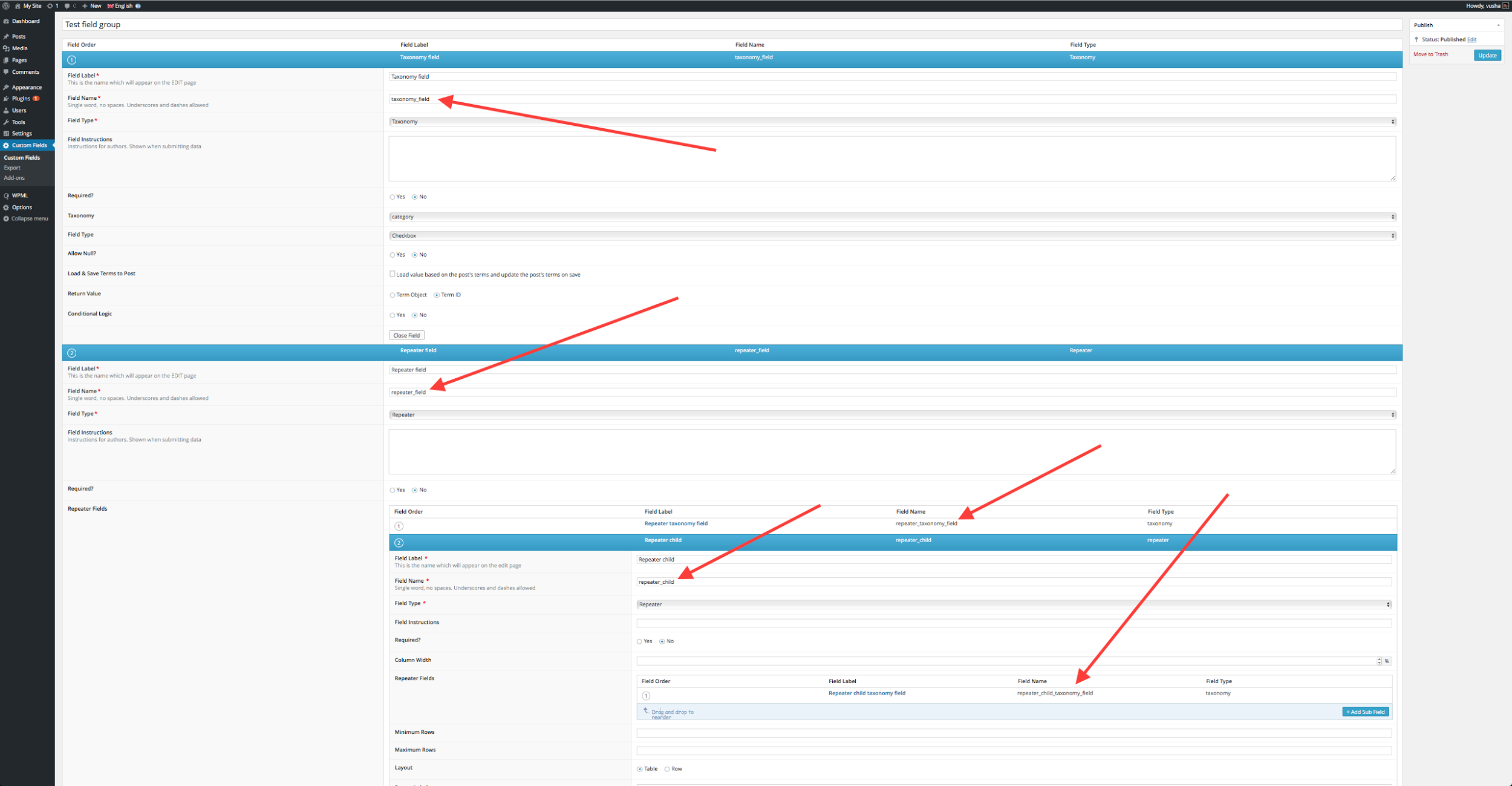
필드 이름(‘taxonomy_field’, ‘repeater_field_0_repeater_taxonomy_field’ 등)을 사이트에 있는 필드 이름으로 교체해야 합니다. 이를 수행하려면 다음 단계를 따르세요.
위의 예에서는 필드 그룹에 다음 항목이 있습니다.
– 택소노미 필드 1개
– 택소노미 필드가 있는 리피터 필드 1개 및 자체 택소노미 필드가 있는 또 다른 “하위” 리피터 필드 1개.
즉, 중첩은 다음과 같습니다.
Taxonomy
Repeater {
         Taxonomy
         Repeater Child {
                        Taxonomy
         }
}
즉, 다음 이미지에 표시된 예에서와 같이 필요에 따라 필드를 설정해야 합니다.
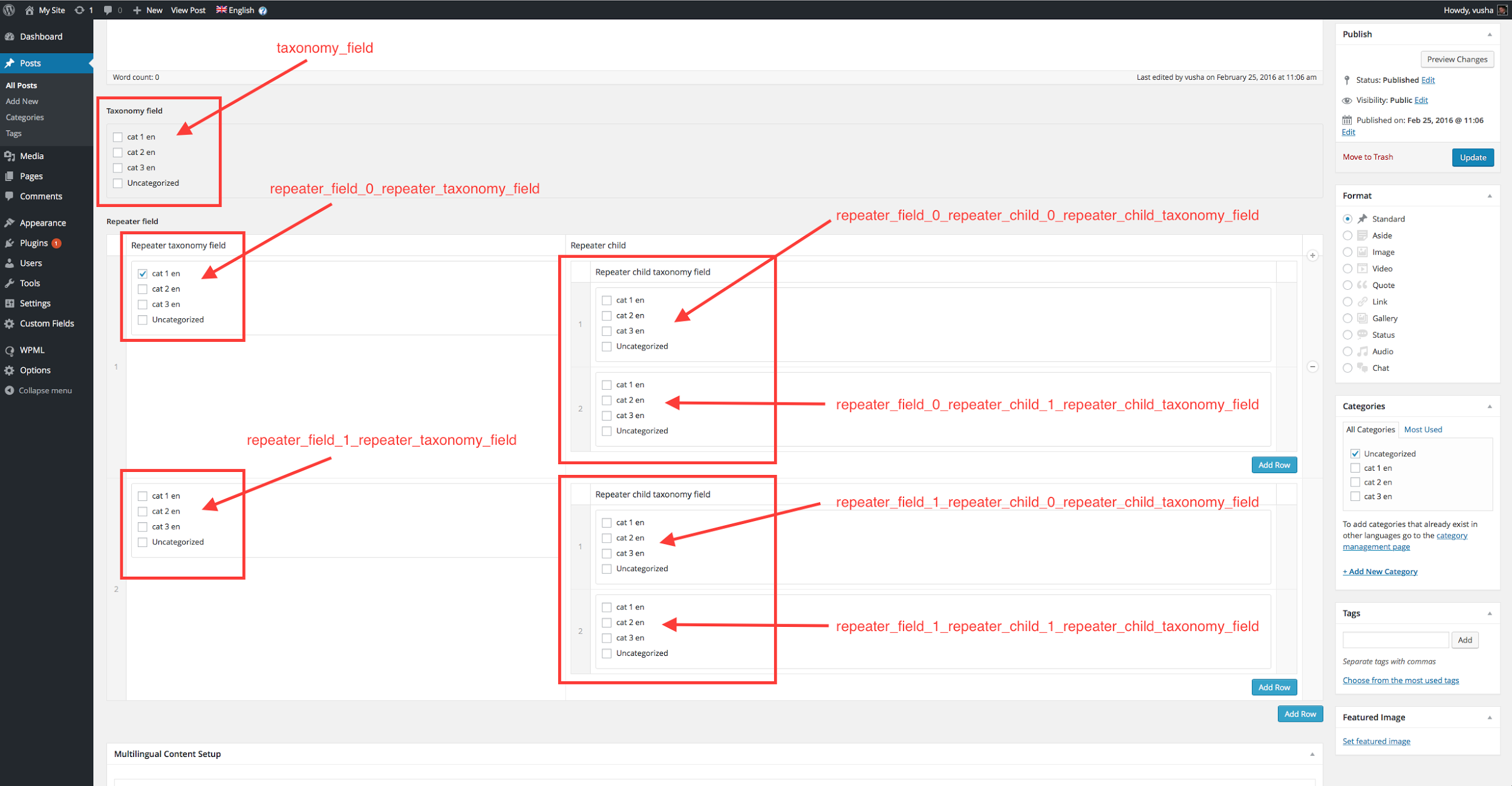
글, 페이지 또는 사용자 정의 필드를 사용하는 모든 글 유형을 편집할 때 해당 필드가 작동하는 것을 볼 수 있습니다. 다음 이미지는 이 예에서 어떻게 보이는지 보여줍니다.
참고: 배열의 key =>; value 쌍을 적절한 값으로 교체해야 합니다.
배열 키 교체:
키로 사용된 필드 이름을 주의 깊게 살펴보면 필드가 0부터 인덱싱된다는 것을 알 수 있습니다.
즉, 첫 번째 리피터는 0, 두 번째는 1이 됩니다. 이러한 리피터 번호는 밑줄을 사용하여 다른 하위 필드 유형과 구분되며, 다음과 같습니다. _0_, _1_, _2_…
예를 들어 첫 번째 리피터 내의 택소노미 필드 이름은 'repeater_field_0_repeater_taxonomy_field'이며, 이 이름을 위의 스니펫 배열에 넣습니다. 다음 세 가지 사항에 주의하세요.
- 배열 내부에 사용하는 모든 필드를 키로 넣고, 아래 나열된 유형 중 하나인지 확인합니다.
- 필드 이름의 형식이 올바르게 지정되었는지 확인합니다.
- 각 리피터 행마다 필드 이름이 개별적으로 추가되었는지 확인합니다. 즉, 10개의 리피터 행 이름이 있는 경우 다음과 같습니다. 'repeater_field_0_some_custom_field', 'repeater_field_1_some_custom_field', 'repeater_field_2_some_custom_field' … 마지막 'repeater_field_9_some_custom_field'까지 추가됩니다.
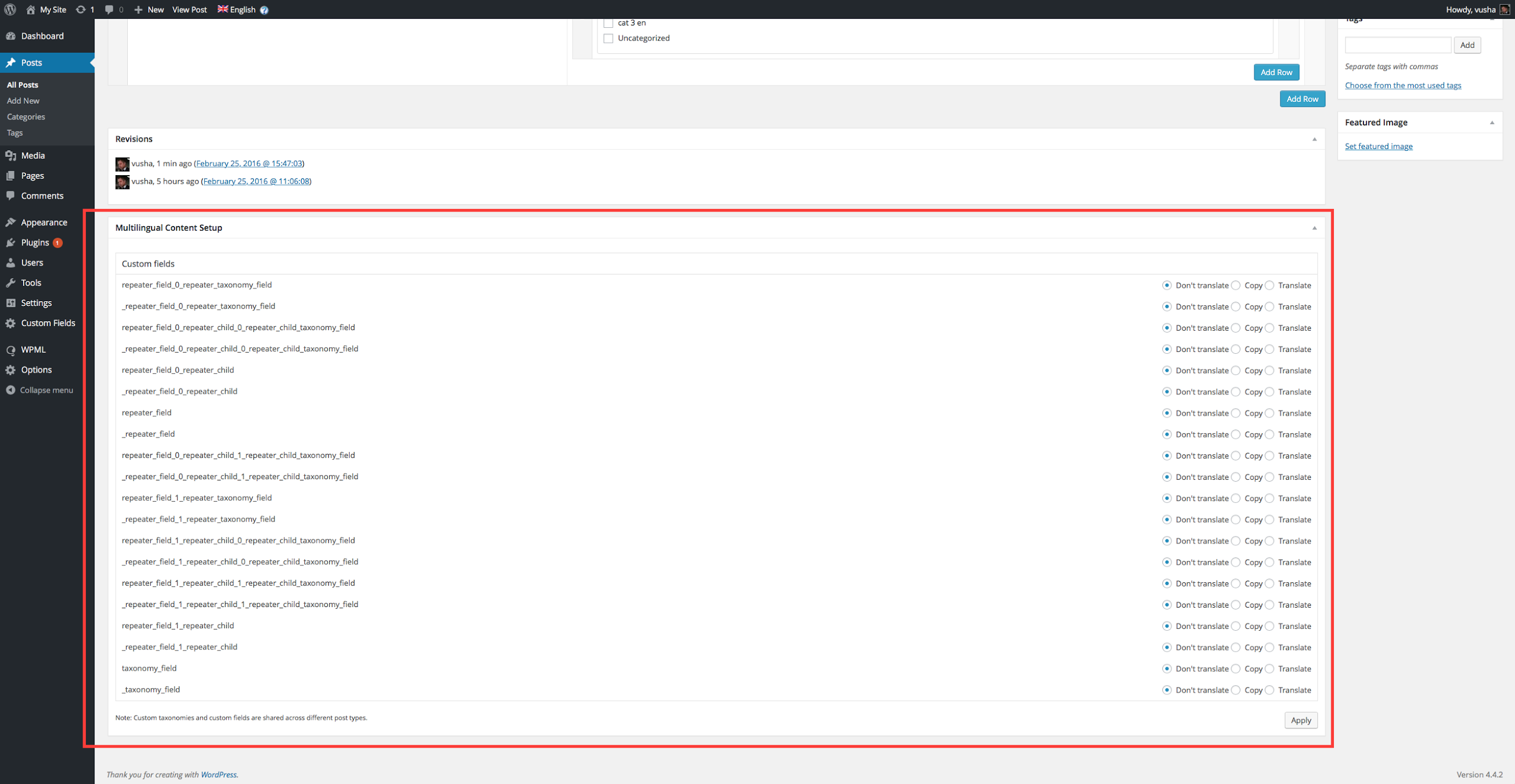
상황에 맞게 ‘some_taxonomy_name’, ‘some_other_taxonomy_name’ 등과 같은 값을 교체합니다. 이는 ID가 속한 요소의 유형입니다. 다음 중 하나일 수 있습니다. post, page, attachment, {custom post type key}, nav_menu, nav_menu_item, category, post_tag, {custom taxonomy key}
자세한 내용은 여기에서 훅 문서를 확인하세요.