


- 状态
- 已解决
- 报告针对
- WPML Multilingual CMS 3.3.6
问题概述
Repeater 附加组件提供了一个 repeater 字段类型,旨在包含其他字段类型。为了让用户能够复制 repeater 内的内容,必须添加一个代码片段,并按照“临时解决方法”部分中的说明仔细添加字段名称。
此问题目前存在于以下字段类型:
- 图像
- 文件
- 图库
- 分类法
- 文章对象
- 页面链接
注意:您可以将提供的代码片段用于所有其他字段类型。唯一的区别在于字段的名称。这意味着您可以使用此代码片段来解决 repeater 和常规字段类型的复制问题。
您可以在此处找到这些字段类型的勘误。
临时解决方法
您可以在 functions.php 文件中使用此代码片段,以使复制功能正常工作:
function wpml_fix_acf_duplication( $value_to_filter, $target_language, $meta_data ) {
  // Field names should be placed into following array.
  $fields = array(
     'taxonomy_field' => 'some_taxonomy_name',
     'repeater_field_0_repeater_taxonomy_field' => 'some_other_taxonomy_name',
     'repeater_field_1_repeater_taxonomy_field' => 'some_other_taxonomy_name',
     'repeater_field_0_repeater_child_0_repeater_child_taxonomy_field' => 'some_other_taxonomy_name',
     'repeater_field_0_repeater_child_1_repeater_child_taxonomy_field' => 'some_other_taxonomy_name',
     'repeater_field_1_repeater_child_0_repeater_child_taxonomy_field' => 'some_other_taxonomy_name',
     'repeater_field_1_repeater_child_1_repeater_child_taxonomy_field' => 'some_other_taxonomy_name'
  );


  if ( array_key_exists( $meta_data['key'], $fields ) ) {
		$value = maybe_unserialize( $value_to_filter );

		if ( is_array( $value ) ) {
			// If custom field value contain array of IDs to translate, usually used for gallery and taxonomy field types.
			$translated_ids = array();

			foreach ( $value as $v ) {
				$translated_ids[] = apply_filters( 'wpml_object_id', $v, $fields[ $meta_data['key'] ], true, $target_language );
			}

			return maybe_serialize( $translated_ids );
		} else {
			// If custom field value contain single ID to translate, usually used for image and file field types.
			$translated_id = apply_filters( 'wpml_object_id', $value, $fields[ $meta_data['key'] ], true, $target_language );

			return $translated_id;
		}
	}

	return $value_to_filter;
}
add_filter( 'wpml_duplicate_generic_string', 'wpml_fix_acf_duplication', 999, 3 );
请注意,您应将字段名称('taxonomy_field’、'repeater_field_0_repeater_taxonomy_field’ 等)替换为您网站中的字段名称。请按照以下步骤执行此操作。
在上述示例中,我们的字段组包含以下内容:
– 一个分类法字段
– 一个带有分类法字段的中继器字段,以及另一个带有自身分类法字段的“子”中继器字段。
这意味着嵌套结构如下所示:
Taxonomy
Repeater {
         Taxonomy
         Repeater Child {
                        Taxonomy
         }
}
这意味着您需要根据自己的需求设置字段,正如我们在下图中显示的示例所做的那样。
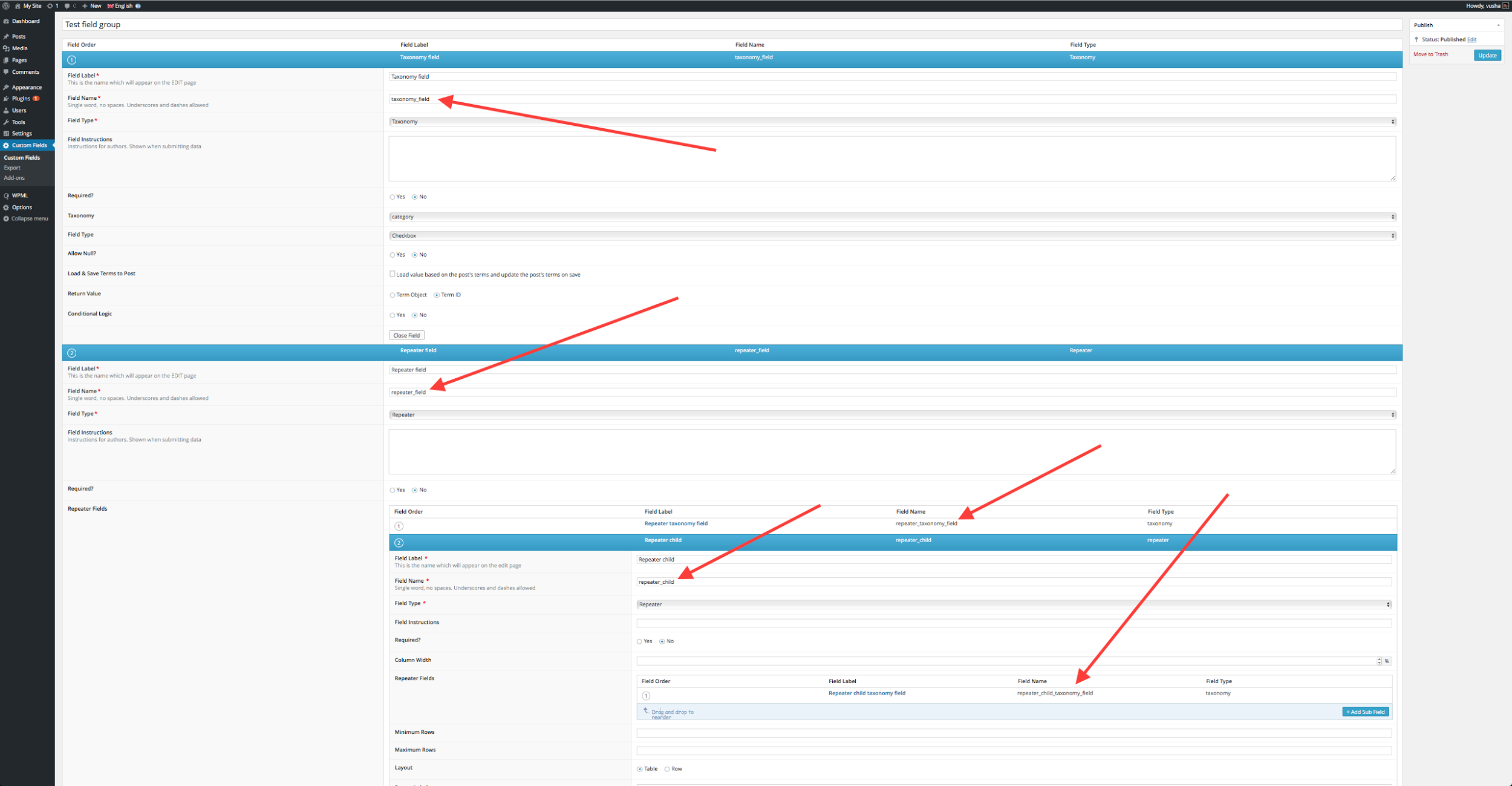
当您编辑文章、页面或使用自定义字段的任何文章类型时,您将看到这些字段的实际效果。下图显示了在我们的示例中的外观:
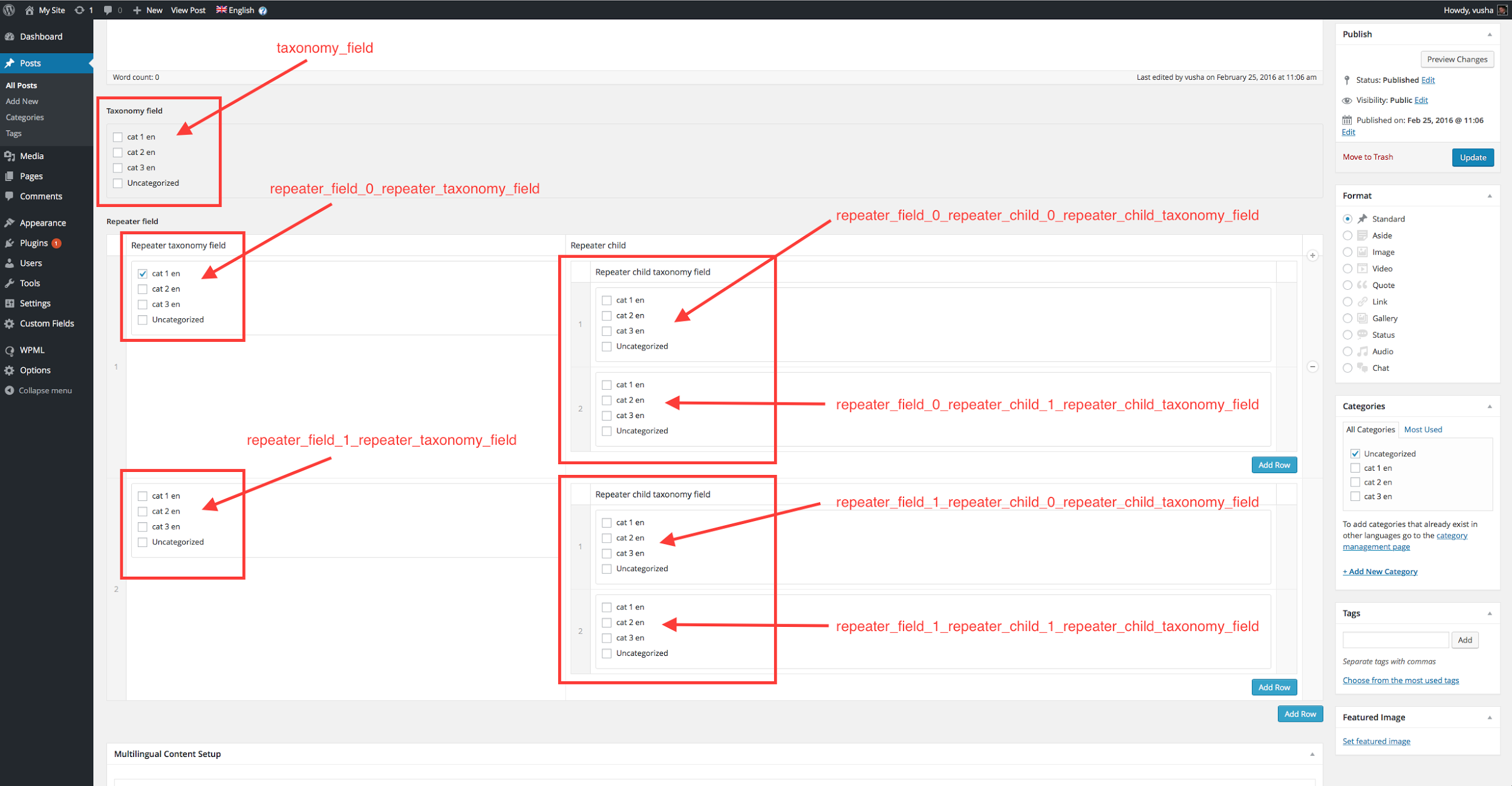
注意:您应将数组的 key =>; value 键值对替换为正确的值。
替换数组键:
如果您仔细观察我们作为键的字段名称,您会发现字段是从 0 开始索引的。
这意味着您的第一个中继器是 0,第二个是 1,依此类推。这些中继器编号通过下划线与其他子字段类型分隔,例如 _0_、_1_、_2_…
例如,我们第一个中继器中的分类法字段名称是 'repeater_field_0_repeater_taxonomy_field',这就是我们要放入上述代码片段数组中的名称。请确保您注意以下三点:
- 在数组中,将您使用的每个字段作为键,并确保它是下面列出的类型之一
- 字段名称的格式正确
- 分别为每个中继器行添加字段名称,即如果您有 10 个中继器行名称,它将如下所示:'repeater_field_0_some_custom_field'、'repeater_field_1_some_custom_field'、'repeater_field_2_some_custom_field' … 一直到 'repeater_field_9_some_custom_field'。
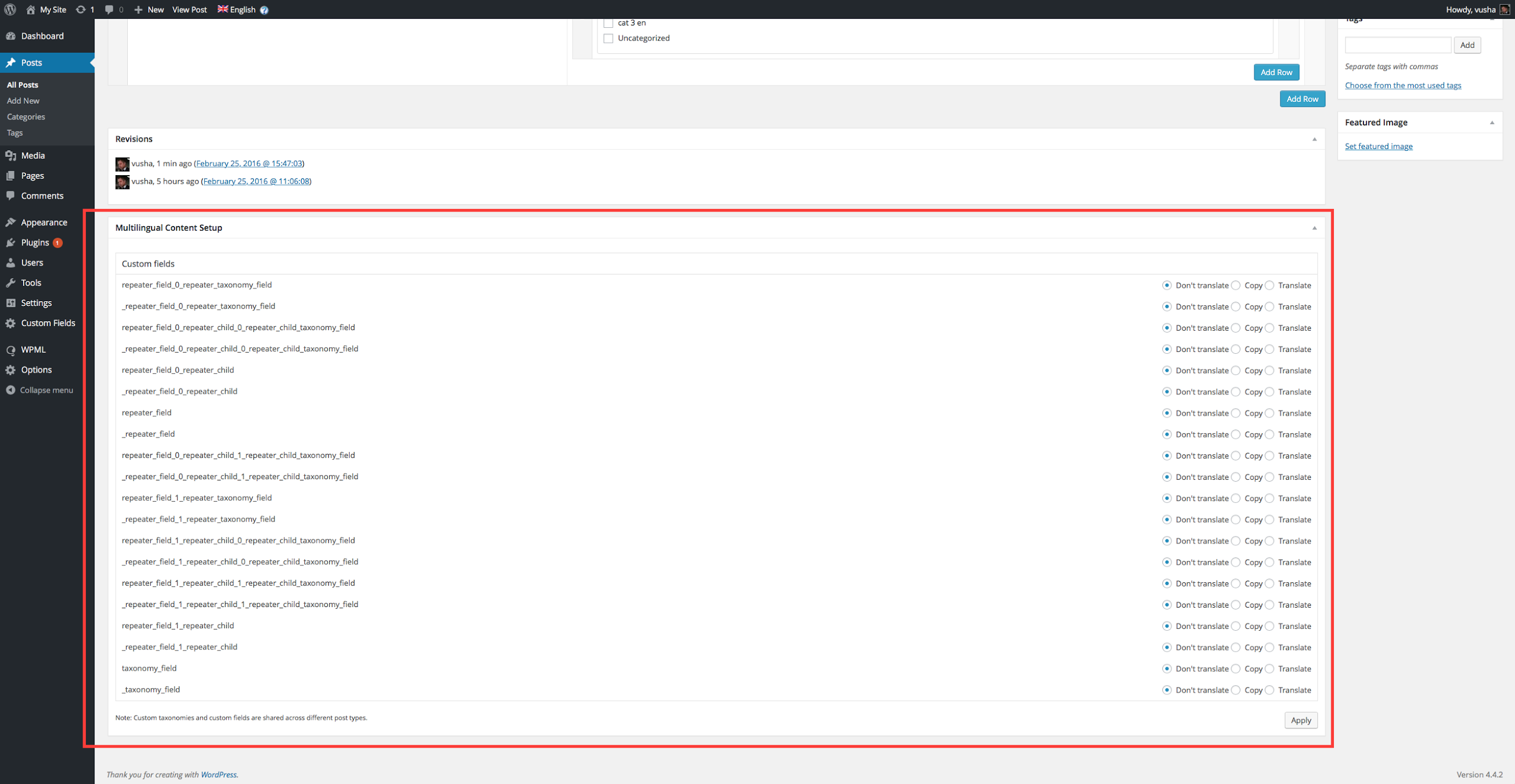
相应地替换值,例如:'some_taxonomy_name’、'some_other_taxonomy_name’ 等。这是 ID 所属的元素类型。可以是 post、page、attachment、{custom post type key}、nav_menu、nav_menu_item、category、post_tag、{custom taxonomy key}
如需了解更多信息,请查阅我们的钩子文档:点击此处。