


add_filter( 'wcml_custom_prices_fields', 'the_callback_function', 10, 2 );
- Type
- filter
- Category
- Multi-currency Feature
- WooCommerce Multilingual Version
- 3.8
Description
- Add additional custom price fields to products.
- These fields are displayed in the Set prices in other currencies manually section when editing/creating original products.
- To add custom price field labels, see the wcml_custom_prices_fields_labels hook.
Arguments
There are two parameters passed to this filter:- $fields
- (array) The custom price field array.
- $product_id
- (integer) The ID of an original product.
Example usage
Use the example code provided below to get results shown in the following screenshot.
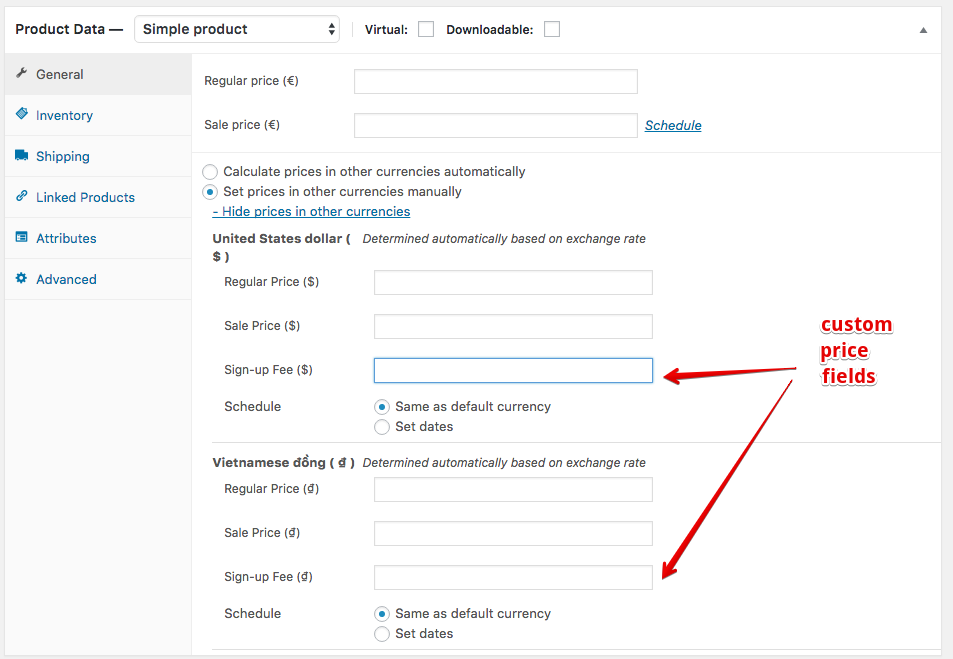
Example
/*
 * Add this code to the functions.php file of your theme.
 */
add_filter( 'wcml_custom_prices_fields',  'add_custom_price_fields', 10, 2 );
function add_custom_price_fields( $fields, $product_id ) {

    // Add a new custom price field
    $fields[] = '_sign_up_fee';

    return $fields;

}


add_filter( 'wcml_custom_prices_fields_labels', 'set_labels_for_price_fields', 10, 2 );
function set_labels_for_price_fields( $labels, $product_id ){

    // Edit the label of a custom price field
    $labels[ '_sign_up_fee' ] = __( 'Sign-up Fee', 'woocommerce-multilingual' );

    return $labels;

}
Related hooks
wcml_custom_prices_fields_labels, wcml_is_cache_enabled_for_switching_currency, wcml_geolocation_get_user_country, wcml_user_store_strategy, wcml_rounded_price, wcml_currencies_without_cents, wcml_product_custom_prices, wcml_custom_prices_strings, wcml_switch_currency, wcml_multi_currency_ajax_actions