


WPML for WooCommerce 5.5.3 — Improved Link Handling and More
WCML 5.5.3 focuses on how links work across languages, from category and account pages to Shop page links.

 3 minutes
WooCommerce Multilingual 5.3 focuses on seamless integration with High Performance Order Storage (HPOS), stronger compatibility with WooCommerce add-on plugins, performance enhancements, and other fixes.
Since publishing this post, we released WooCommerce Multilingual 5.3.1 to fix an issue related to using Stripe to make payments in secondary currencies.
To ensure a smooth and reliable experience, we strongly recommend updating to this latest version of WooCommerce Multilingual.
With the debut of WooCommerce 8.2 came High Performance Order Storage (HPOS), which provides significant speed improvements to your store’s performance.
Now, WooCommerce Multilingual 5.3 brings full compatibility with the High Performance Order Storage (HPOS) feature. You no longer need to fiddle with settings and enable the compatibility mode. Simply select High Performance Order Storage in WooCommerce → Settings and enjoy better order processing on your multilingual site.
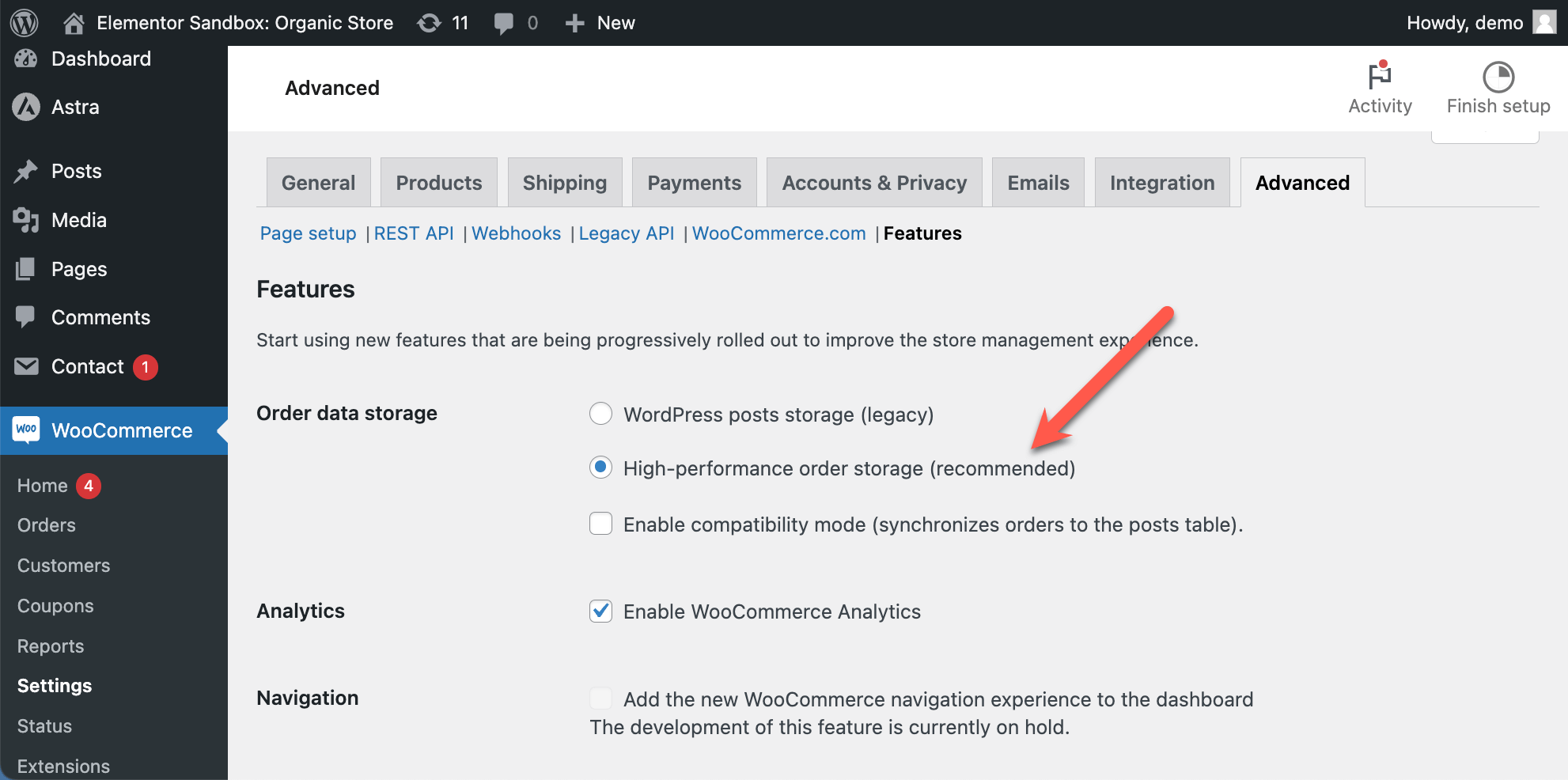
On existing WooCommerce sites, you can switch to HPOS or if you prefer so, stay with the WordPress posts storage (legacy) setting. Both settings will work just fine.
WPML Multilingual & Multicurrency for WooCommerce continues to support the legacy method of storing order data.
This release improves compatibility with WooCommerce Bookings and addresses a number of issues related to:
WPML Multilingual & Multicurrency for WooCommerce 5.3 also fixes the multicurrency integration with the Product Add-ons extension.
WooCommerce Multilingual 5.3 optimizes performance, giving you and your site’s visitors a smoother and faster experience.
Key performance improvements include:
With WooCommerce Multilingual 5.3, you can translate product attribute labels in the WooCommerce REST API, enhancing multilingual for product attributes in API responses. Plus, if you use the Checkout block, you can now translate your payment gateway strings.
This release additionally comes with fixes for multi-currency features and pricing details, such as correcting currency symbols and price rounding. It also includes fixes related to missing translations for product variations.
For a full list of what’s included in this release, please see the changelog.
We release updates to sites gradually. Once it’s made available to you, you will receive this update on your registered sites.
If you want to get WooCommerce Multilingual 5.3 without waiting, go to the Plugins → Add New page and click the Commercial tab. There, click the Check for updates button, select WPML Multilingual & Multicurrency for WooCommerce, and click to update it.
Please note that it might take up to 24 hours for all sites to be able to see the update, even if you manually check for it in the Commercial tab.
Have a question about the new update or a thought you’d like to share? We’re all ears! Leave a comment below to join the conversation.
WCML 5.5.3 focuses on how links work across languages, from category and account pages to Shop page links.
There is a critical compatibility issue in the upcoming WooCommerce 10.3 release that causes miscalculation of product variation prices.
We just released WooCommerce Multilingual 5.5.0! This major version brings better usability, improved performance, and a few new feature requests.