


WPML 5.0 Beta – A Redesigned Experience and Smarter Automatic Translation
WPML 5.0 is the biggest update we’ve shipped in years.

We just released a first beta for WPML 3.9. This beta includes a new translation mode which completely removes the need to duplicate content, when you need it to display when not translated.
Let’s say you’re developing a listing site that includes English, French and Italian. You probably want new listing to appear in all the site’s languages. When you translate a listing, the translation should replace the untranslated-original.
 Until now, to do this with WPML, you’d have to duplicate the listings into all the site’s languages. Doable, but not fun.
WPML 3.9 will include a new translation mode, which allows to display content in all the site’s languages, without duplicating it.
While the basic idea is simple, making it happen is a little more tricky. When you enable the new translation mode, WPML does some magic behind the scenes:
Have a look at this clip to see how it works:
This translation mode makes it a lot easier to run multilingual e-commerce, listing, directory and classifieds sites. In fact, any site that has a lot of content, which you don’t want to necessarily translate will benefit from this new translation mode.
It’s a beta and not yet ready for production sites, so please only install it on development sites.
Then, in your site, go to WPML->Translation Management->Multilingual Content Setup and scroll down to the Post Types Translation section.
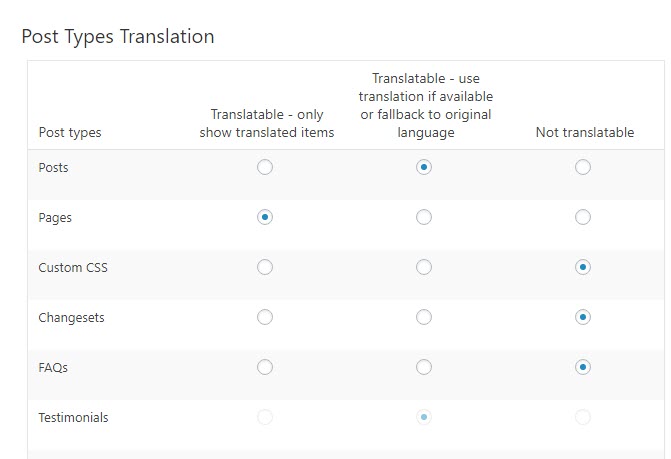
The new mode is called “Translatable – use translation if available or fallback to original language” (not very short, but hopefully clear).
If this mode is grayed out and you cannot select it, there’s a configuration file that hard-sets a different translation mode. In the production WPML release, you’ll be able to freely switch from the old “Translated” mode to the new one. As it’s not yet ready in this beta, let’s use a workaround.
Go to WPML->Translation Management->Custom XML Configuration and paste an XML snippet to override the setting:
<wpml-config>
    <custom-types>
        <custom-type translate="1" display-as-translated="1">CPT-SLUG</custom-type>
    </custom-types>
</wpml-config>
Replace “CPT-SLUG” with the actual slug of the post-type that you want to control.
Right now, taxonomies are not fully supported yet. It’s almost there and we’ll have full support for taxonomies in the production release.
WPML 3.9 corrects the workflow. If you create content, start translating and then edit the original, you will see that it “needs translation”. When you translate again, the partial translation that you already did will appear in WPML’s Translation Editor and you can continue with the parts that were not complete or are new.
If you’re using a page builder, try the new “update while translating” and see if this works as you expect it.
To report problems, best to create a new thread in the technical support forum and leave a comment here with a brief description and a link to the thread.
WPML 5.0 is the biggest update we’ve shipped in years.
We just released WPML 4.9.4, which brings full compatibility with WordPress 7.0.
WPML 4.9.1 is out today with a focus on Divi 5 compatibility, so your multilingual sites are ready for the official Divi 5 launch on February 26.