


WPML 4.9.1 is out today with a focus on Divi 5 compatibility, so your multilingual sites are ready for the official Divi 5 launch on February 26. This release also includes Elementor fixes, updated PHP requirements, and more.
A few weeks ago, we released WPML 4.9.0, which brought improvements to automatic translation workflows and performance with object cache. WPML 4.9.1 is a follow-up maintenance release focused on third-party compatibility and bug fixes.
WPML 4.9.2 Is Now Available
Since publishing this post, we’ve released WPML 4.9.2, which includes two important bug fixes.
WPML Is Ready for Divi 5
Divi 5 is set to move from beta to production on February 26. We’ve spent the last weeks working through compatibility issues you reported.
Smooth Migrations From Divi 4 to Divi 5
When migrating from Divi 4 to Divi 5, source language pages were losing their content. The pages appeared empty in both the backend editor and on the frontend, while translated pages continued to display correctly.
This is resolved in WPML 4.9.1, but there are a few things to keep in mind before you migrate:
- Update to WPML 4.9.1 before running the Divi 5 Migrator.
- If you migrated to Divi 5 before updating WPML, roll back the migration, update WPML, and run the migration again.
Divi Canvases Are Now Translatable
Divi 5 introduced Divi Canvases — a way to create off-canvas menus, popups, and other embeddable content for your pages.
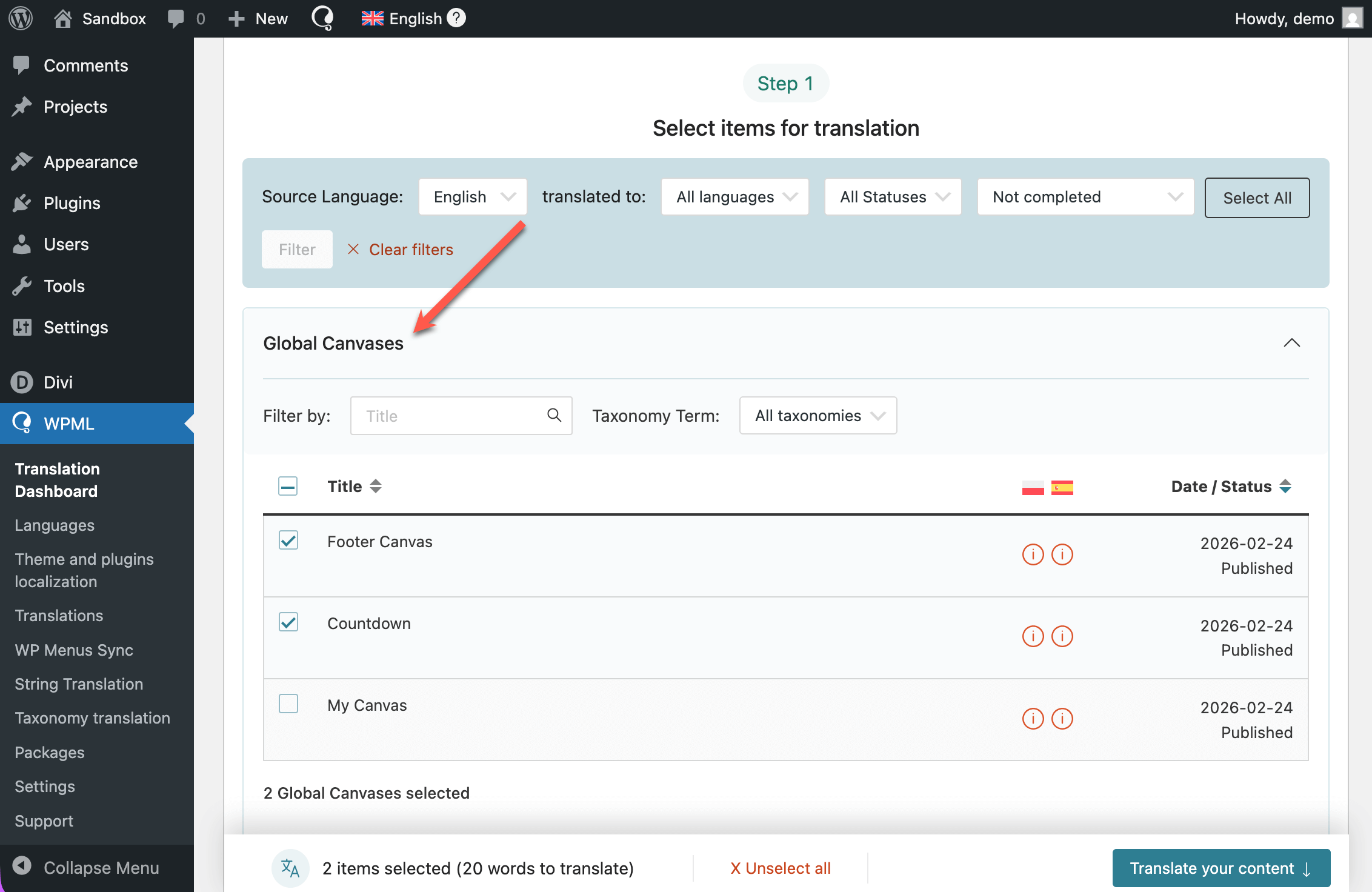
WPML 4.9.1 now recognizes Divi Canvases as a custom post type, so you can translate them like any other content. To get started, go to WPML → Translation Dashboard and find the Global Canvases section. All your canvases will be listed there, both page-specific and global.
One Known Issue Remains
If you use dynamic content in Divi 5, dynamic field text settings such as “Before” and “After” cannot be translated yet. We’re aware of this issue and working on a fix for an upcoming release.
Better Compatibility With Elementor
This WPML release also includes the following Elementor-related fixes and improvements:
- Nav Menu, Mega Menu, and Theme Builder templates now show the correct translated content on the frontend, whether you translated them using automatic translation or the Advanced Translation Editor.
- When using WooCommerce products inside Elementor loop-grid queries, filters now return the correct results on translated pages.
Besides this, we’re continuing to expand WPML compatibility with Elementor Editor v4, which is still in beta. As of WPML 4.9.1, links in atomic buttons can now be translated automatically and in the Advanced Translation Editor. As a reminder, if you run into any issues with Editor v4, let us know in the Elementor Editor v4 erratum comments.

Updated PHP Requirements
With WPML 4.9.1, we’ve stopped officially supporting PHP 7.0, 7.1, 7.2, and 7.3. These versions are no longer maintained by the PHP project and do not receive security updates.
To keep your site secure and compatible with future WPML releases, please upgrade your server to PHP 7.4 or higher (PHP 8.3 recommended).
More Fixes and Improvements
This release includes more than 20 additional fixes. Highlights include:
- Smoother URL migration — When WPML detects a change in your site’s URL, the migration banner now guides you through your options more clearly.
- No more false positives with Wordfence — WPML 4.9 was triggering an incorrect security warning when used alongside Wordfence. This is now resolved.
For the full list, see the changelogs for WPML 4.9.1 and String Translation 3.5.1.
How to Update WPML
We’re releasing WPML 4.9.1 gradually. When it becomes available to your site, you’ll see it on your Plugins page.
If you want to update right away:
1
In your site’s admin, go to Plugins → Add New Plugin and click the Commercial tab.
2
Click the Check for updates button.
3
Select WPML 4.9.1 and String Translation 3.5.1 from the list and click Install.
Make sure you update both WPML and String Translation. You need both to benefit from all the fixes and improvements in this release.