


ACF Multilingual 2.2.0 – Easier Options Page Translation and Better Local Fields Support
Translate Options Pages directly in Translation Dashboard, manage local fields more easily, and enjoy faster performance with ACFML 2.2.0.

WPML ElasticPress 2.0 allows you to add an advanced, accurate and fast search engine to your multilingual WordPress site.
By using the WPML ElasticPress glue plugin together with WPML and ElasticPress, you can easily manage your content-rich site and give users reliable search results in the right language.
When your website has a lot of content, making search easy can be tough. Your visitors expect a smooth search experience, just like they get on sites like Google and Amazon.
The challenge here is to first, provide accurate results according to the user’s search. And then, you want the search to be fast and not stress out your server.
WordPress comes with a simple, built-in search tool, but it’s way too basic for larger sites with extensive content, multiple custom post types, and products.
ElasticPress uses the Elasticsearch engine to transform the search experience on WordPress sites. It allows you to enjoy sturdy search functionality that’s kind to your server and offers:
Without the WPML ElasticPress add-on, ElasticPress will store all of your content as if it were written in one language. In such a case, a user searching for something in Spanish may see results in all the languages on your site.
WPML ElasticPress offers a solution that lets you add the power of Elasticsearch to your multilingual WordPress website. The glue plugin integrates directly with the Sync Settings in ElasticPress → Sync to sync and analyze the content in each language on your WPML-powered website.
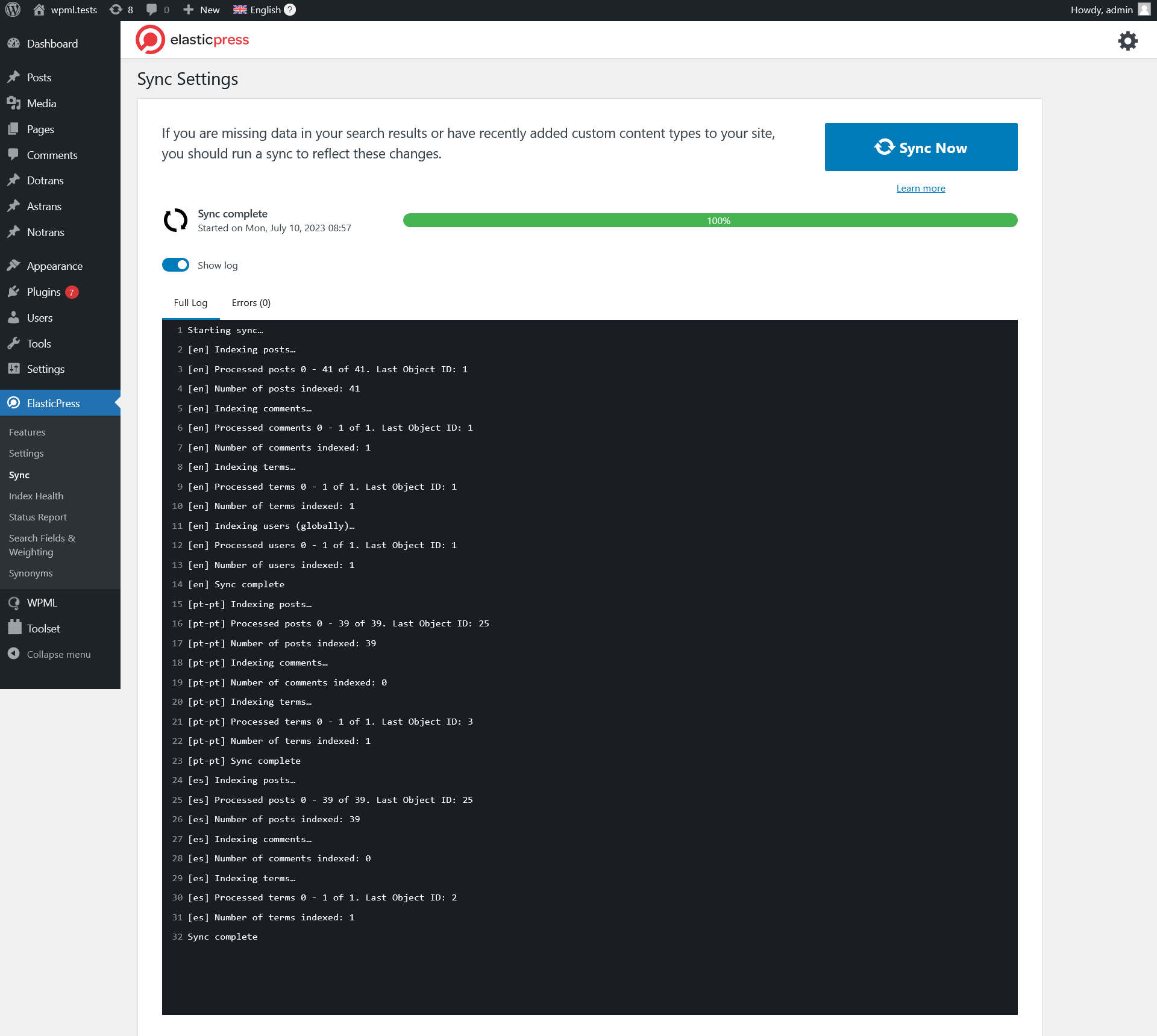
The recently released WPML ElasticPress 2.0 brings a host of new features, including:
After installing WPML ElasticPress or updating from WPML ElasticPress 1.0 to 2.0, we recommend syncing your content. This guarantees each language on your site gets its own language index.
If you have a content-heavy website, keep in mind the sync process may take a few hours.
To get started with WPML ElasticPress 2.0, navigate to the WPML Downloads page.
If you already have WPML ElasticPress installed on your site, you can update it directly from your site’s admin by going to Plugins → Add new and clicking over to the Commercial tab.
What search are you using on your sites? Did you hear about Elasticsearch and ElasticPress before?
We’d love to hear about your experience, let us know in the comments!
Translate Options Pages directly in Translation Dashboard, manage local fields more easily, and enjoy faster performance with ACFML 2.2.0.
We just released WPML ElasticPress 2.1.0, which adds multilingual support for ElasticPress’s popular Documents feature.
We just released WooCommerce Multilingual 5.5.0! This major version brings better usability, improved performance, and a few new feature requests.