


WPML stores language, translation, and string data in custom database tables. Learn how these connect to WordPress tables and content.
WPML’s Database Model
The following diagram shows the model of the tables that WPML uses:
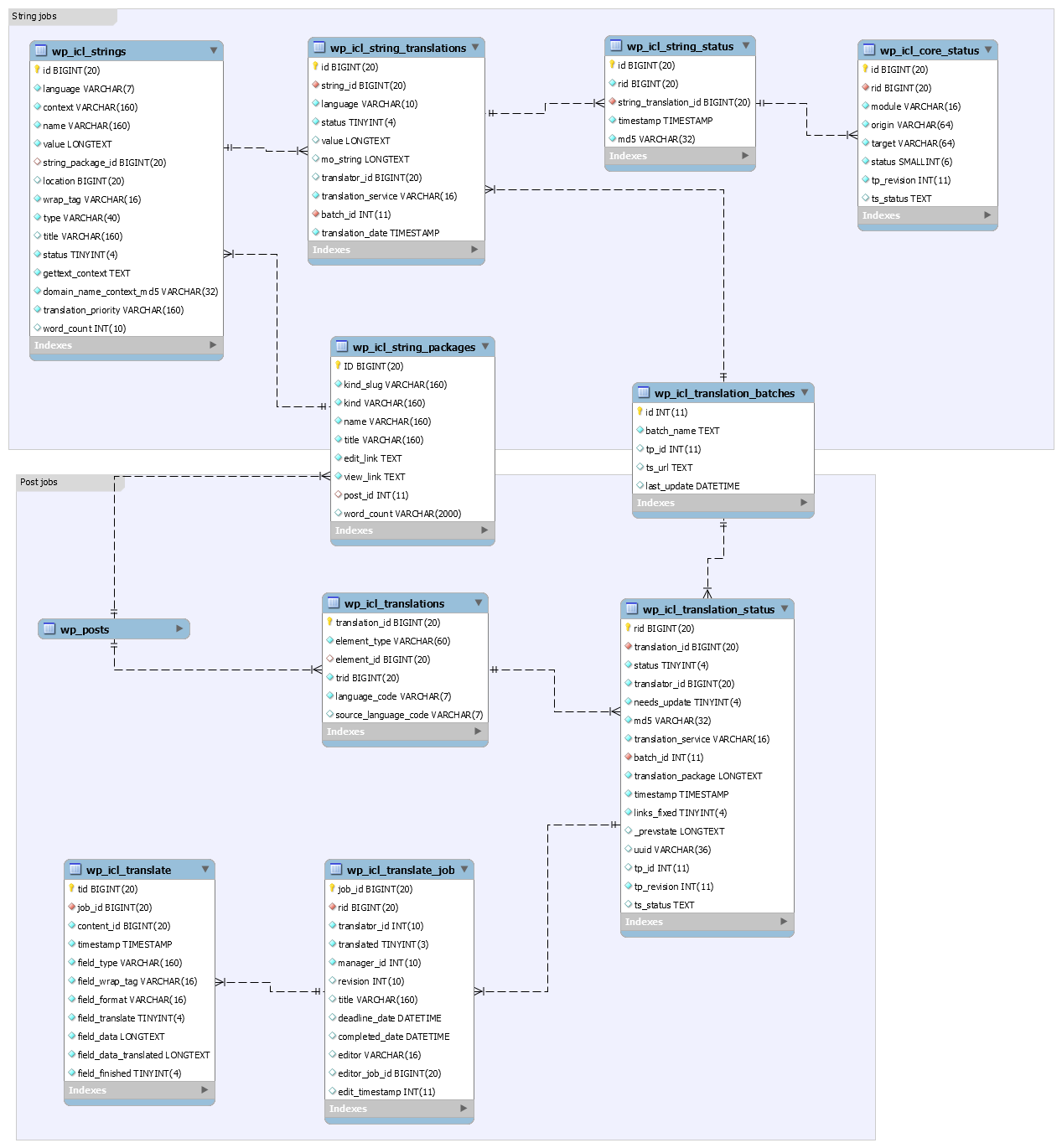
Language and Translation Table
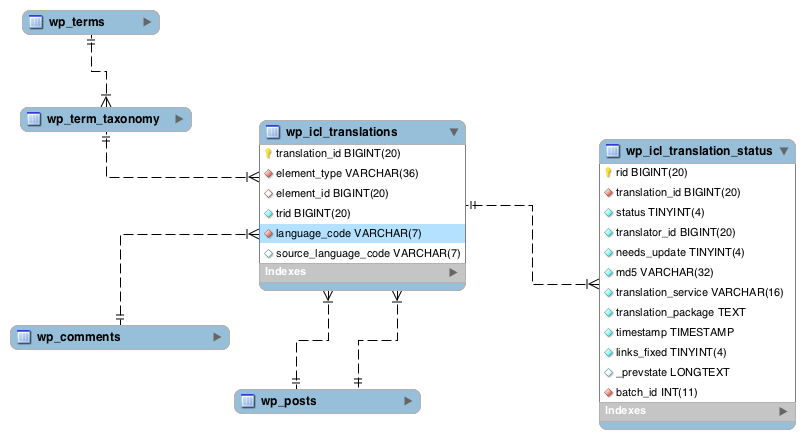
The table that holds the language and translation information is called icl_translations.
- Each site content element configured as translatable (post, page, tag, category, custom post type, and custom taxonomies) has an entry in this table. Note: Comments are not translatable but they have a record in icl_translations because they have language information assigned to them.
- The entry specifies the item’s language and the translation group (element type) it belongs to.
- Entries of the same translation cluster share the same value in element_type and trid columns.
- The entry with no source language (NULL) in the same cluster is the original entry.
It has the following columns:
- translation_id – serial number
- element_type – the type of the element. This value is explained and retrieved in the hook wpml_element_type.
- element_id – the ID of the item (post_id for post types, term_taxonomy_id for taxonomy terms)
- trid – the ID of the translation group
- language_code – language code of the item
- source_language_code – if translated, the language of the original item
For example, if we have an English post with ID=3, that is translated to Spanish and the Spanish translation has ID=7, the icl_translations table will look like this:
| translation_id | element_type | element_id | trid | language_code | source_language_code |
|---|---|---|---|---|---|
| 1 | post_post | 3 | 2 | en | NULL |
| 2 | post_post | 7 | 2 | es | en |
| * Because the two entries have the same trid value for trid, they are translations of one another. The value itself is not important. | |||||
WPML can also optimize the translation tables on a site whose tables have grown.
Country Flag Table
WPML ships with a large collection of country flags. Be aware that associating languages with countries can be problematic. Many languages are spoken (sometimes differently) in different countries. However, country flags are still a helpful visual cue and help visitors spot their language easily.
WPML’s country flags are stored in the res/flags directory and the icl_flags table indicates which flag to return for each country. The columns of the icl_flags table are:
- id – serial number
- lang_code – the language code
- flag – the name of the flag file
- from_template – “0”: take the flag from WPML’s res/flags folder, “1”: take the flag from the theme directory
If you want to use a different flag, go to WPML → Settings → Languages → Manage and Hide Site Languages, click Edit on the language’s row, and open its flag list. Its last entry, Upload a custom SVG, takes a file of your own.

The same screen is where you add a custom language.
String Translation Table
Most WordPress sites include some strings that don’t belong to any item (post, page, tag, category) but still need to be translated – for example, the blog’s tagline.
WPML includes a mechanism called String Translation, to handle these strings.
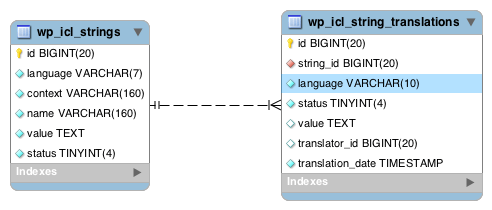
The strings are kept in the icl_strings table with the following columns:
- id – serial number
- language – language
- context – the string’s context (indicates what the string belongs to)
- name – name of the string
- value – the strings value (its contents)
- string_package_id - ID of the package that the string belongs to
- type – type of editor to use when editing the string via the translation editor ( LINE, AREA or VISUAL )
- title – the title of the string to display in the translation editor
- status – translation status indicating if the string is fully translated to all languages
- gettext_context – the context set in the gettext function, eg _x
- domain_name_context_md5 – unique key to improve lookup performance
Translations of a string are kept in the icl_string_translations table:
- id – serial number
- string_id – the ID (serial number) of the string being translated
- language – the language of the translation
- status – the status of the translation (complete / not complete)
- value – the translation itself
- translator_id – id of translator
- translation_service – translation service used to translate the string. Can be empty, local or a remote service
- batch_id – ID of the batch when a string is translated by a translation service
- translation_date – date of translation
All WPML Tables
Here is a complete list of all the tables WPML uses:
wp_icl_background_taskwp_icl_content_statuswp_icl_core_statuswp_icl_flagswp_icl_languageswp_icl_languages_translationswp_icl_locale_mapwp_icl_message_statuswp_icl_mo_files_domainswp_icl_nodewp_icl_reminderswp_icl_stringswp_icl_string_batcheswp_icl_string_packageswp_icl_string_positionswp_icl_string_statuswp_icl_string_translationswp_icl_translatewp_icl_translate_jobwp_icl_translationswp_icl_translation_batcheswp_icl_translation_downloadswp_icl_translation_status