


- Status
- Resolved
- Resolved in
- 3.5.3.1
Overview of the issue
The issue happens when using the Repeater field option in ACF Pro along with WPML, where the Repeater field’s parent field is set to be copied to the translated post.
As a result, the translated post’s Repeater subfields are not displayed correctly – no matter how many repeater subfields you add to the translated post, the admin lists as many subfields as the original language post has.
For example, when you create a post in your default language and add four fields in the Repeater field, then translate this to the secondary language, you will not be able to add more than four fields in the repeater field of the secondary language.
Workaround
- Navigate to your translated post from your WordPress dashboard.
- Scroll down to the Multilingual content setup section.
- Find the ID of your repeater field and set its translation option to Don’t translate.
- Click the Apply button.
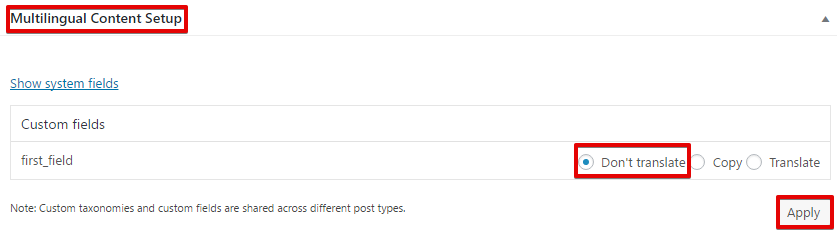
Note that you might not be able to choose the Don’t translate option for a specific custom field (radio buttons are disabled) as it is set to Copy.
In this case, follow the below steps:
- In your WordPress dashboard navigate to WPML -> Translation Management -> click the Multilingual Content Setup tab and scroll down to the Custom Field Translation section.
- Find that specific field and change the option from copy from original to translation to Don’t translate and click on the Save button

- On your WordPress dashboard navigate to Plugins -> Installed Plugins and Deactivate the WPML Translation Management plugin.
- Go to the post that you want to translate and edit/add your translated content to the repeater custom field.
- Navigate to the Plugins page and Activate the WPML Translation Management plugin.