


WPML 5.0 Beta – A Redesigned Experience and Smarter Automatic Translation
WPML 5.0 is the biggest update we’ve shipped in years.

You probably know that we’re pretty serious about building the best translation workflow possible for sites that use page builders. In this release, we have significant improvements for almost all page builders and introducing support for another popular builder.
Want to know why?
<TL;DR> WPML uses the String Translation table to store texts that require translation in page builders. Until now, we could only find these texts by their values, because all page builders don’t have unique IDs for cells (yes, that’s how it is). So, if you changed a cell, WPML could not find the previous translation for it. Even if it was a tiny edit, you’d still need to retranslate that cell from scratch. </TL;DR>
We decided that this is not “something little that people can live with”. We wouldn’t want to have it on our own sites. So, we did a major update to the String Translation table and to the Page Builders translation logic. Now, we match texts for cells according to value, position and assignment.
In plain English, this means that the only way to lose existing translations now is if you would:
Then, WPML is going to have a hard time connecting between cells and their translations. When you need to do massive edits on existing pages (created with page builders), all you need to do is save frequently. First, move things around and then save. Then, change cell content and save again. Or, edit and save and then move and save. Doesn’t matter. This way, WPML keeps track of the translations of cells and you’re not losing your existing translations.
Try it!
Now, when you translate pages with such links, WPML will automatically update the links to go to translated content. WPML already does that for links in text cells. From now on, we’re also covering links in “speciality” cells.
Why would anyone need something like this?
Consider a theme like Avada. Avada uses custom fields to store per-page settings. For example, it stores settings for the styling of the page heading.
With this new mode, you can translate pages with Avada and all the settings are automatically applied to the translated content. Then, you can edit the translations and modify the appearance of the title per language. Until now, you have to choose between locking these fields between all translations and having to see these fields in the translation editor. The new mode allows you to automatically sync once and then have the freedom to update separately.
Right now, we applied it to the configuration of Avada theme only. We’re updating the configurations of other themes to take advantage of this new mode. If you’re using a theme that would also benefit from it, let us know (in the comments) and we’ll work with the theme author to apply a similar update for that theme too.
To get this update, log-in to your WPML account and click on Downloads. Change the selector at the top of the page to Beta. We updated the downloads page, so you’ll see this:
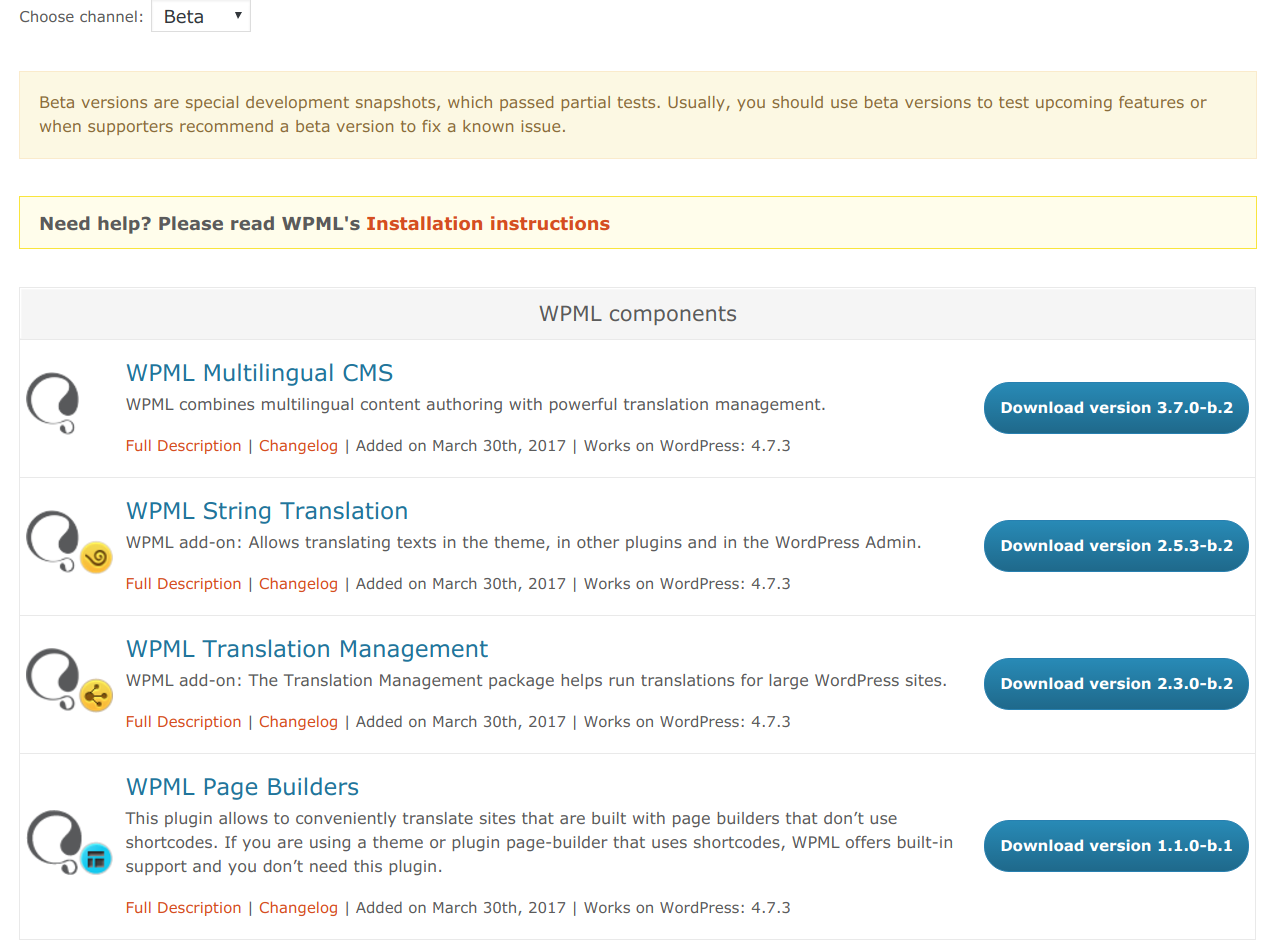
If you’re not seeing the beta downloads, do a full refresh (CTRL-F5). You need to install:
Right now, this requires a manual process so almost nobody does it. It’s a lot of hassle to keep track of which images appear on different pages and replace them manually.
We’re working on a major update to the Media Translation plugin, which will allow you to review the different images in the site and set “translations” for them. Then, it doesn’t matter where these images appear, WPML will replace them with their translation. This is a big project and we’re only at its beginning. We’ll try to have it in WPML 3.8.
We’re also working on the Translation Feedback module, which we previewed a few weeks ago.
WPML 5.0 is the biggest update we’ve shipped in years.
We just released WPML 4.9.4, which brings full compatibility with WordPress 7.0.
WPML 4.9.1 is out today with a focus on Divi 5 compatibility, so your multilingual sites are ready for the official Divi 5 launch on February 26.