


WPML 5.0 Beta – A Redesigned Experience and Smarter Automatic Translation
WPML 5.0 is the biggest update we’ve shipped in years.

This release of WPML focuses on “under-the-hood” improvements, with one goal. To improve stability and integration.
Overall, this release handles over 70 issues. Here are the highlights.
This release packs a nice list of improvements for Avada, Elementor, Beaver Builder and Divi.
For Avada, we’ve added and improved the translation support for dynamic fields, layouts and sections. We’ve also added a warning that will protect users from accidentally overwriting translation that’s “in progress”.
For Elementor, we’ve improved the support for link fields, maintenance mode, template translation, and custom captions.
For Beaver Builder, we’ve improved the handling for global modules, front-end editor support, and various modules.
For Divi, we’ve fixed the integration with Search, so that visitors stay in the right language. We’re also covering odd cases where you’re using combinations of Divi builder and theme-builder modules. And we added support for translating background images for columns.
WPML 4.3.12 improves the logic for translating custom fields. This greatly improves performance for posts that have lots and lots of fields.
Complete list of fixes:
As always, the best way to update WPML on your sites is automatically. WordPress will tell you that the new version is ready. Click on Update for all the WPML components that you’re using and you’re all set.
We push new versions gradually. If you need this version quickly and you’re not seeing it in the WordPress Updates, you can force it. In the WordPress admin, go to the Plugins → Add New page, click the Commercial tab, and then click Check for updates. This will force the installation of the current version, without waiting for “your turn to arrive”.
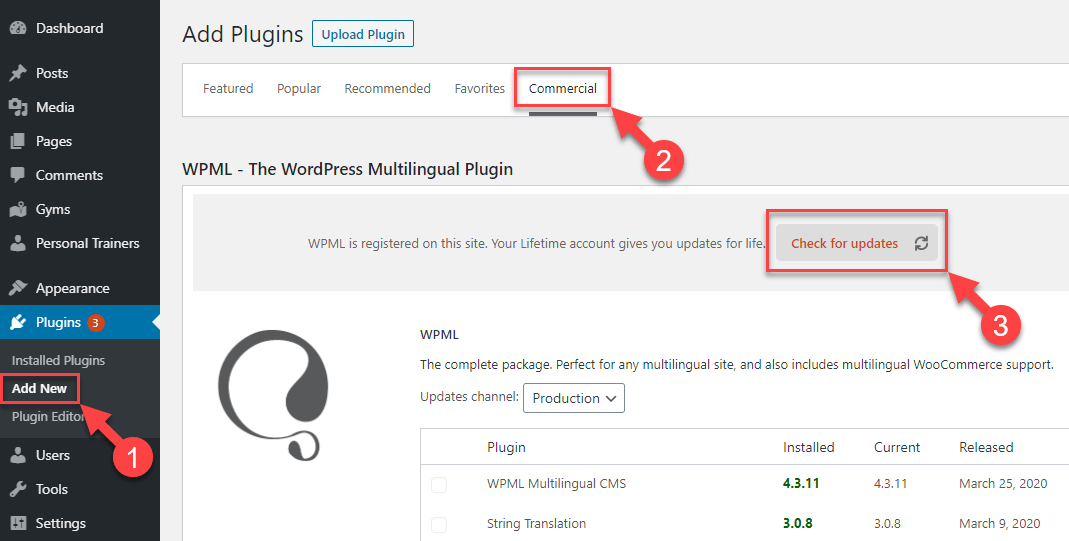
You can always download WPML manually from your account.
Leave your comments and we’ll write back.
WPML 5.0 is the biggest update we’ve shipped in years.
We just released WPML 4.9.4, which brings full compatibility with WordPress 7.0.
WPML 4.9.1 is out today with a focus on Divi 5 compatibility, so your multilingual sites are ready for the official Divi 5 launch on February 26.