


WPML Export and Import 1.1.0 - Automate Importing of Your Multilingual Content
We’ve just released WPML Export and Import 1.1.0.

 3 minutes
We just released the initial, alpha version of WPML Export and Import, our newest add-on plugin that’s set to redefine how you import multilingual WordPress content.
The traditional way of importing multilingual content into WordPress can feel like navigating a maze.
You need to balance separate import files, go through various settings, and stay alert for duplicate images or misconnected taxonomy terms. Plus, the workflow depends on the import plugin you use.
In essence, it’s a multi-step process that requires precision. And mistakes? All too easy to make.
WPML Export and Import introduces a completely new approach. Instead of syncing with a specific import plugin, it modifies the language information after the content import. This allows you to enjoy:
WPML Export and Import leverages WordPress’s native meta fields to set the language of your imported content and connect translations.
To get started, all you need to do is:
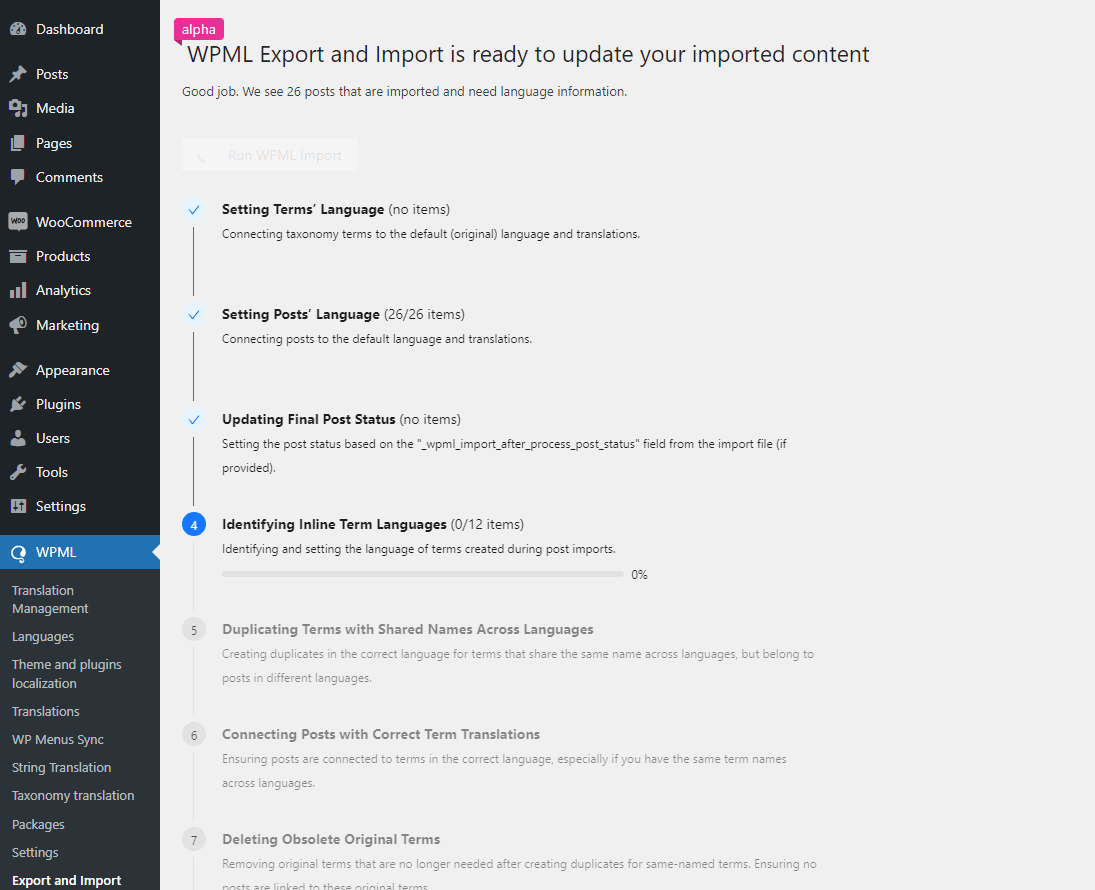
See the WPML Export and Import documentation for more details.
At this early alpha stage, it is easy for us to adapt WPML Export and Import to different workflows and needs. If you encounter scenarios we haven’t anticipated, we can still make changes based on your feedback.
Test WPML Export and Import on your development site and tell us:
By sharing your experiences, highlighting challenges, or suggesting improvements, you’re ensuring that WPML Export and Import will seamlessly integrate with your workflows right from its first major release.
To start testing WPML Export and Import, go to your Downloads page, click Download WPML manually, and scroll down to the WPML Export and Import plugin.
We’ve just released WPML Export and Import 1.1.0.
Managing your website’s translations just got a whole lot easier.
This update includes several important fixes to enhance your experience when translating and managing multilingual forms created with WPForms and WPML.