


WPML for WooCommerce 5.5.3 — Improved Link Handling and More
WCML 5.5.3 focuses on how links work across languages, from category and account pages to Shop page links.

WPML’s Sticky Links are internal links between pages and posts, which follow their destinations and automatically update when target URLs change.
Despite their similar (and confusing) name, they have nothing to do with WordPress Sticky Posts and Pages.
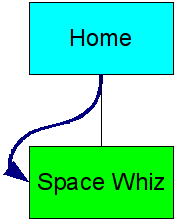
Supposing there are just two pages in our website – a Home page and a page called Space Whiz (our latest and greatest and only product). From Home there’s a link to Space Whiz. We’re using fancy URLs so its address is:
oursite.com/space-whiz/Space Whiz is doing great so we’re writing a sequel – Space Attack. We’re creating a new Products page, making it the parent page of both our programs. So now, we have:
oursite.com/products/
oursite.com/products/space-attack/
oursite.com/products/space-whiz/
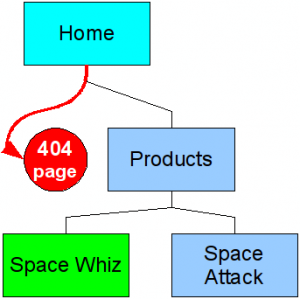
What’s going to happen to our home page link that points to oursite.com/space-whiz/?
It’s pointing at the wrong place. The URL for that page is changing to oursite.com/products/space-whiz/ (WordPress cleverly redirects to the new URL, but this is done based on guesswork. I can tell you more about it if you’re interested).
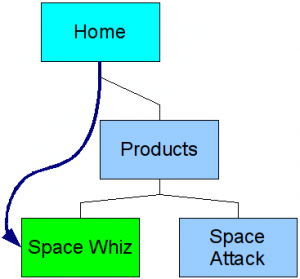
Wouldn’t it be nice if that home page link magically updated to the correct URL?
This is exactly what Sticky Links do.
When Sticky Links are enabled, all internal links between pages and posts update automatically when their URLs change. If a page’s URL (permalink) changes, all links to it will update instantly.
This might illustrate it a bit better.
| Before | After |
|---|---|
 |
 |
| Before | After |
|---|---|
|
 |
WPML’s Sticky Links are like connectors. They track where pages go and follow them – hence the name.
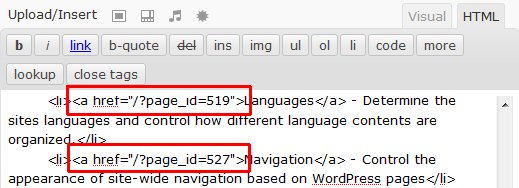
When you save a page or a post, WPML checks for links to other pages or posts. It replaces all such links with default style links. Instead of saving <a href="http://oursite.com/space-whiz/">, it will save <a href="/?page_id=5"> (or whatever the page ID is). This is the default style URL.
Then, when the page is displayed, WPML replaces back all the links to their current URLs. When the Space Wiz URL is http://oursite.com/space-whiz/, this is what you’ll get. When it changes, the links in all pages update immediately.
If you don’t want to use Sticky Links any more, you can revert them to the current permalinks. WPML will run through all pages on posts in the database and change the links back.
When visitors view your pages (or when you preview them), it’s all fancy links.
This is where Sticky Links really shine. You can change the permalink structure ten times a day and nothing will break. Since the links between pages are calculated when pages are displayed, all the links between pages and posts will always be correct – no matter what you change.
WCML 5.5.3 focuses on how links work across languages, from category and account pages to Shop page links.
Last month, we released WPML 4.8 , which upgrades how glossaries work with AI translation.
We just released WPML Multilingual & Multicurrency for WooCommerce 5.5.0 Beta.