


Best WooCommerce Checkout Plugins (6 Tested)
We tested six WooCommerce checkout plugins on field customization, editor usability, and Classic and Block checkout compatibility to help you find the right fit.

There may come a day when you want to redesign your website or create a backup. Maybe you’ll want to move your site to a different server, or duplicate it so you don’t have to create a similar one from the ground up. No matter the reason, you’ll want to be able to move your data with ease.
Before diving into our list of suggested import/export plugins, it’s important to understand how WordPress stores your content, your data.
Every WordPress site, no matter its size, is made up of different types of data. You already know many of them just from using your site:
All this information is stored in the WordPress database which is just a set of simple tables. There is a table for storing post information, another one for storing user information, and so on. These tables basically work just like the spreadsheets you know from applications like Excel or Google Sheets.
In the following image, you can see an illustrated version of a WordPress database:
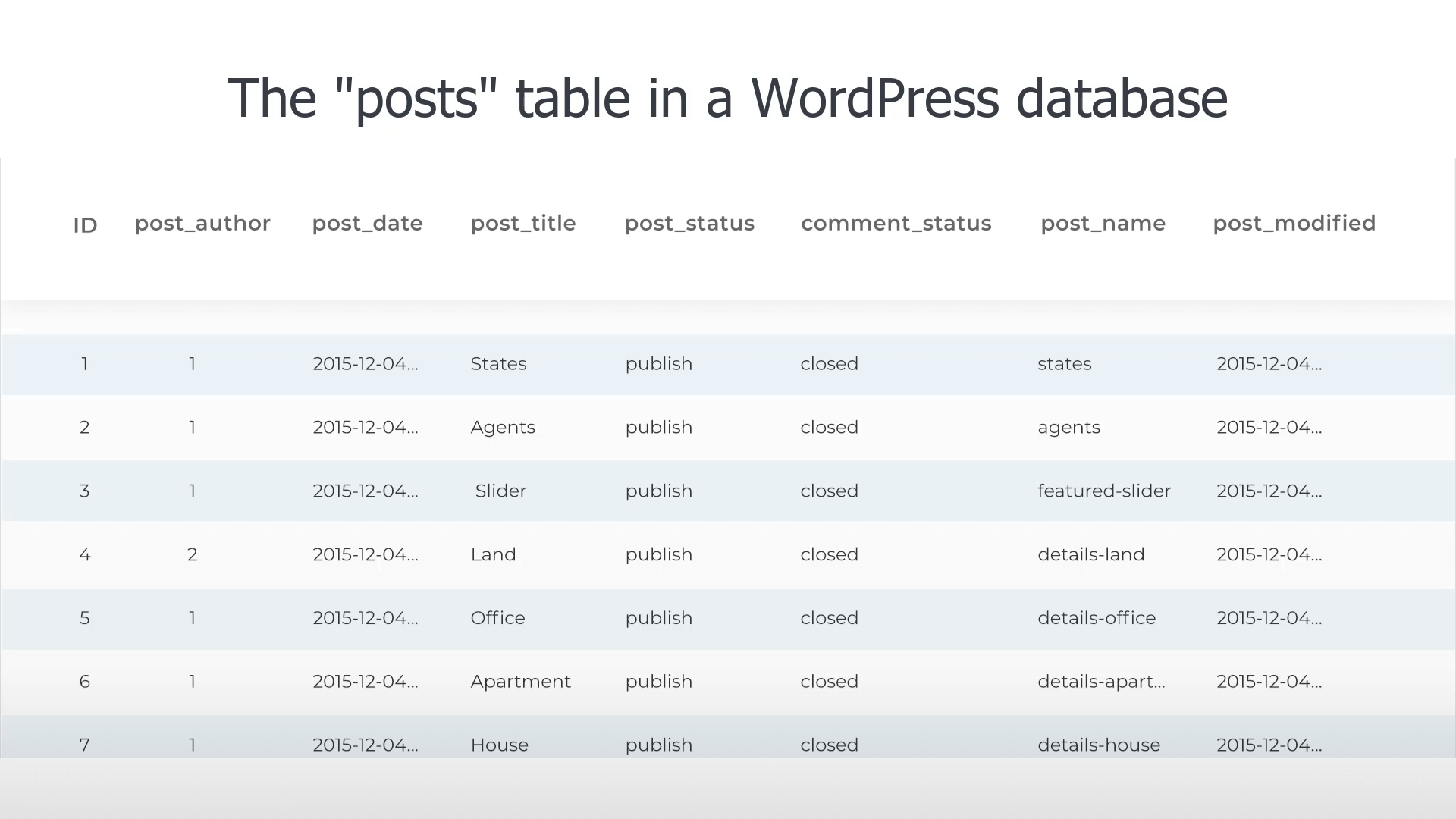
As you can see in the image above, the table dedicated to posts has multiple columns. Each column represents a particular part of information related to your posts. This includes the post ID, title, author, and date of creation. And each post on your site has its own row in this table.
When the day to move your data comes, you’ll need to access the WordPress database. While there are tools like phpMyAdmin, they tend to be geared toward developers and users with advanced technical experience.
Thankfully, you don’t need to be a developer to handle your site’s database. There are plugins that you can use right from the WordPress admin. These plugins export your whole database, or specific parts of it into files that can then be imported back into another site, or stored offsite.
Most of these plugins export the information into XML and CSV formats, but don’t let the terminology daunt you. These are simply types of files used to store information coming from databases. For example, you can even open CSV files in any spreadsheet editor and you will see the content presented on a sheet.
Depending on whether you want to import and export all your data or specific types of data, you may find that certain plugins fit your requirements more than others. For this reason, we’ve divided our top plugins into two categories:
If you want to move large amounts of content or even your whole database, an all-in-one plugin is the way to go. These plugins come equipped with advanced and easy-to-use features.
While some listed plugins have free versions, you may need to purchase the premium or pro versions to gain access to certain features or to handle multilingual data.
Posts, pages, WooCommerce products, taxonomies, media, and other custom fields and post types – WP All Import can handle it all.
With WP All Import, you can import your data to WordPress from any XML, CSV, or Excel file. The interface is easy to use, allowing you to drag and drop the content you want to import. WP All Import accepts a variety of files, so you can upload any file type, size, and structure. The plugin also offers Automatic Scheduling, so you can run your imports on a schedule.
WP All Import has an in-built code editor which allows you to create your own custom PHP functions. It also has an extensive API that includes many hooks. By combining these hooks with your own custom code, you can import almost any type of data.
We recommend using WP All Import Pro ($99-$399) in conjunction with WPML Export and Import for the best experience when it comes to moving your multilingual content.
According to Soflyy, “If it’s in WordPress, you can export it”.
WP All Export supports all types of data, be it custom term meta, stock info, or user data. Similarly to its companion import plugin mentioned above, this export plugin has an easy-to-use drag and drop interface that allows you to rearrange spreadsheet columns and data fields. You can also schedule your exports.
With WP Export, you can write and test PHP inside the plugin. Or, use the advanced builder to write your feed in XML.
To export WooCommerce customers, orders, and add rules to filter export data, you’ll need to purchase the Pro version ($99 – $299). It’s worth noting that WP All Export is also compatible with WPML Export and Import.
WordPress Ultimate CSV, XML Importer Pro streamlines your content management by letting you import or update your website’s content from an XML or CSV file. Import posts, pages, custom posts, WooCommerce, products, taxonomies – all in one go! Import images in bulk from your desktop or external URLs.
This well-rounded import tool comes with advanced export so you can export any content from your WordPress website for easy migration or backup purposes.
You can also schedule automatic imports, updates, and exports to fit your preferences.
Advanced Mapping automatically identifies the CSV fields and maps them with the WordPress fields, so long as the CSV Headers are the same as the WordPress fields. You can also choose the correct option from the drop-down menu and use drag ‘n’ drop mode mapping for even faster mapping. Supports many file formats for export and offers advanced filter exports.
Although a free version of this plugin is available, you can only import, update, and export multilingual data with the Pro version ($149 – $199) of this plugin.
With just one click, this plugin from VJInfotech makes it possible to import and export:
WP Import Export Pro supports multiple file formats, comes with powerful filters and allows you to import and export data in the background. You also get 19 add-ons with the Pro version (including the WPML add-on).
The WP Import Export Pro plugin allows you to import data with drag and drop field mapping. If you’re looking to export data, you can rearrange and edit fields with just one click.
We recommend using this plugin in conjunction with the WPML Export and Import add-on for the best experience. Both the free and pro versions are compatible. Alternatively, you can purchase the premium version ($179) and install their WPML add-on to import and export multilingual data.
With WP Sheet Editor, you can easily edit posts, pages, custom post types, and products from the back-end. Any edits you make in the spreadsheet apply live on the website.
Of course, all the spreadsheet editors include powerful import and export options. You can export the data from your WordPress site, edit it in Excel or Google Sheets, and then import it back.
You can purchase any combination of spreadsheet utility plugins individually or the premium bundled version ($99.99 – $ 299.99) which includes all functionalities.
Sometimes, you may only want to import or export specific types of data, such as user information or products from your online store. The plugins listed in this section have been designed to deal with specific requirements and are great for users who don’t need all-in-one solutions.
Some of these plugins may have free versions, but access to certain features or multilingual support may only be available in the pro or premium versions.
This powerful plugin makes it possible to import and export products and product types from a CSV/XML file through a simple interface that also has AJAX support. You can also import and export images, categories and custom metadata.
The premium version of Product Import Export for WooCommerce also comes with additional features like automatic import and export, support for product reviews, and a variety of filter options.
A free version of this plugin is available, but you’ll need the Pro add-on ($69 – $199) to import and export multilingual product data.
With this plugin you can import and export users and customers from one WordPress site to another in a matter of seconds. You also have the freedom to select which users you want to export, be it by user role or registered date. Customer metadata can also be imported, exported and edited by using the meta keys found in each user profile.
In addition to the above mentioned features, Import and export users and customers also lets you:
Although users and customers are not translatable post types, you can still translate the front-end user submission form that comes with this plugin.
If you’re looking to easily import or export WordPress users and WooCommerce Customers using CSV, this plugin may be the right choice for you. Some key features include:
With Import Export WordPress Users and WooCommerce Customers, you can change values while importing customers and users using Evaluation fields.
Additionally, users of the Pro version ($69-$199) will be able to:
While users and customers are not translatable post types, you can safely use this plugin on a website with WPML installed.
All the plugins listed above come with powerful features that make it easier for you to import or export your data. What’s more, they are all compatible with WPML and have been tested and approved by their own developers and the WPML team. As indicated, you may need to install glue plugins, add-ons, or premium versions to obtain full multilingual functionality.
If you’re the owner of a multilingual site, there are a couple of big reasons why you should consider choosing a plugin that supports the import/export of multilingual data:
Once you’re ready to move your multilingual content, you can install and activate the WPML Export and Import add-on. This glue plugin from WPML works alongside your chosen import and export plugins. It doesn’t disrupt your usual workflow but rather sets the language information after the initial import.
WPML Export and Import also integrates with popular export and import plugins, WordPress’ native export and import functions, as well as WooCommerce’s built-in product CSV Importer and Exporter. These integrations enable WPML Export and Import to handle most of the heavy lifting for you. When used alongside these plugins and tools, WPML Export and Import even makes sure that imported content remains hidden from website visitors until it updates the multilingual information, allowing you to maintain a professional site appearance.
Learn more about WPML Export and Import.
Although importing or exporting your data may not be something you’ll have to do on a regular basis, you never know when a WordPress import and export plugin might come in handy. While some of the listed plugins have a more narrow focus than others, they’re all powerful and simplify the process of importing and exporting your data. Best of all, they can also handle your multilingual data.
Have you tried any of the plugins mentioned in this post? Are there any other WordPress import and export plugins you recommend? Let us know in the comments!
We tested six WooCommerce checkout plugins on field customization, editor usability, and Classic and Block checkout compatibility to help you find the right fit.
We’ve just released WPML Export and Import 1.1.0.
Managing your website’s translations just got a whole lot easier.