


- ステータス
- 開発者により解決済み
問題の概要
BeThemeのMuffin Builderで作成されたコンテンツを翻訳しようとすると、翻訳されたコンテンツがフロントエンドに表示されないか、または以下のスクリーンショットのようにコンテンツがエンコードされて表示されます。
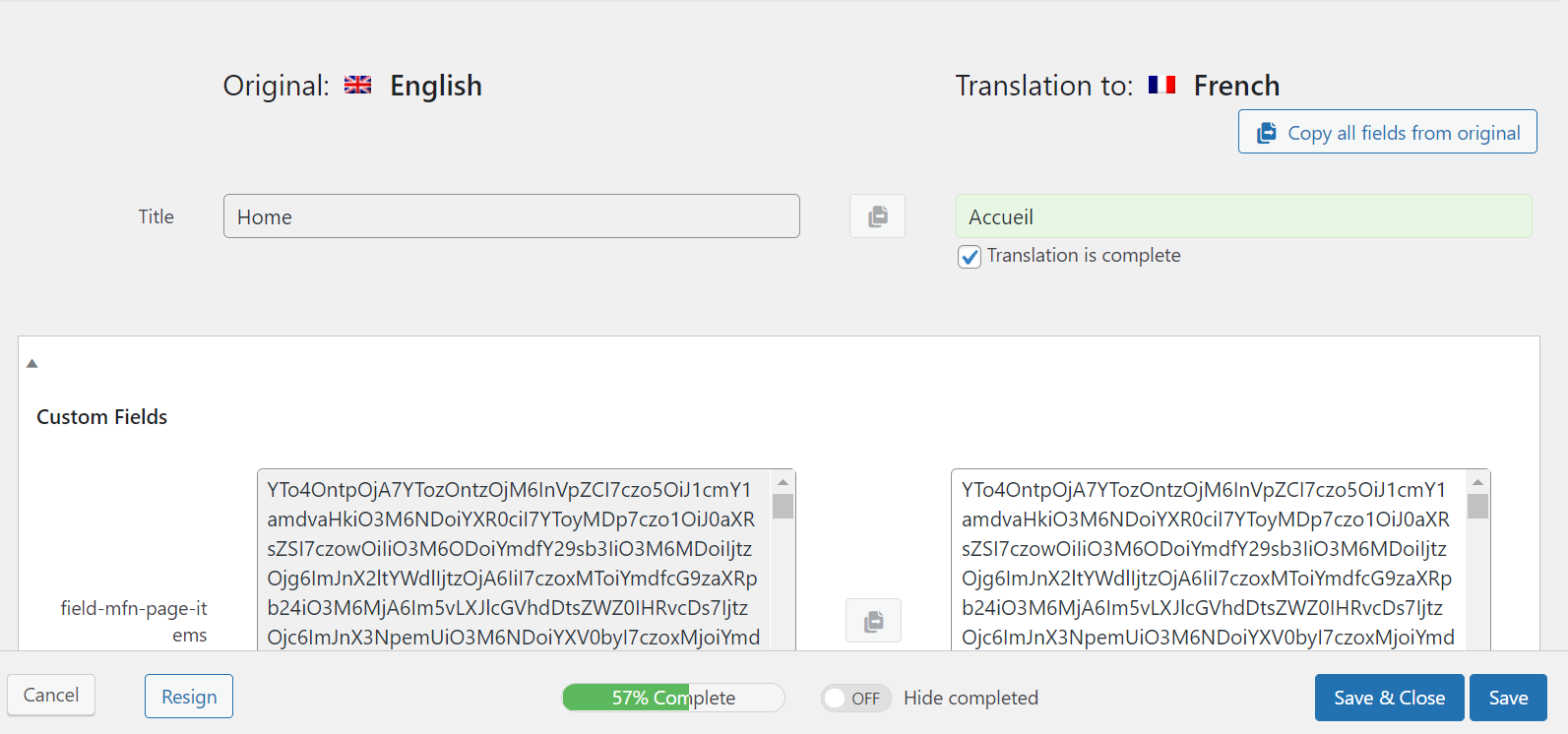
回避策
先に進む前に、必ずサイトの完全なバックアップを作成してください。
- Bethemeを最新バージョンに更新します。
- Betheme > Theme Options > Global > 高度な設定 > Muffin Builder data storageに移動し、Serialized | Readable format, required by some pluginsオプションを選択します。
- wp-content/themes/betheme/functions/theme-functions.phpファイルを開き、以下のスニペットを検索します。
/* * WPML | Workaround for compsupp-5901 */ function mfn_wpml_encode_custom_field( $custom_field_val, $custom_field_name ) { if ( $custom_field_name === 'mfn-page-items' ) { $custom_field_val = maybe_unserialize( base64_decode($custom_field_val) ); } return $custom_field_val; } add_filter( 'wpml_encode_custom_field', 'mfn_wpml_encode_custom_field', 10, 2 ); function mfn_wpml_decode_custom_field( $custom_field_val, $custom_field_name ) { if ( $custom_field_name === 'mfn-page-items' ) { $custom_field_val = base64_encode( serialize($custom_field_val) ); } return $custom_field_val; } add_filter( 'wpml_decode_custom_field', 'mfn_wpml_decode_custom_field', 10, 2 ); - これを以下のスニペットに置き換えます。
/* * WPML | Workaround for compsupp-5901 */ function mfn_wpml_encode_custom_field( $custom_field_val, $custom_field_name ) { if ( $custom_field_name === 'mfn-page-items' ) { $custom_field_val = base64_encode( serialize($custom_field_val) ); } return $custom_field_val; } add_filter( 'wpml_encode_custom_field', 'mfn_wpml_encode_custom_field', 10, 2 ); function mfn_wpml_decode_custom_field( $custom_field_val, $custom_field_name ) { if ( $custom_field_name === 'mfn-page-items' && is_string($custom_field_val) ) { $custom_field_val = maybe_unserialize( base64_decode($custom_field_val) ); } return $custom_field_val; } add_filter( 'wpml_decode_custom_field', 'mfn_wpml_decode_custom_field', 10, 2 ); - すでにページの翻訳を開始している場合は、元のページを編集して保存します。
- 翻訳を更新すると、コンテンツが利用可能になります。
次のステップ
BeThemeおよびMuffin Builderの開発者に連絡しました。できるだけ早く修正が実装される予定です。現時点で必要な作業はありません。