


ACF Multilingual 2.2.0 – Easier Options Page Translation and Better Local Fields Support
Translate Options Pages directly in Translation Dashboard, manage local fields more easily, and enjoy faster performance with ACFML 2.2.0.

 5 minutes
Today, we released WPML Export and Import 1.0. This new add-on plugin introduces a better way to export and import multilingual WordPress content and works with your chosen export and import plugins.
Exporting and importing content on WordPress takes time, especially if you have a website with a lot of content. Managing multiple import files and settings can get tricky. The more complex your data—with custom fields, custom post types, or WooCommerce products with variations—the more steps you face.
We understand these challenges, and we can’t change how the WordPress export and import process works. But, we can ensure that moving multilingual content doesn’t make things harder.
WPML Export and Import presents a fresh approach to multilingual imports and exports. It allows you to use your favorite export and import tools without any added complexity. After importing your content, a single click sets the language information and links translations seamlessly.
WPML Export and Import is a universal solution that is designed to work with all WordPress export and import tools. To enhance your import experience even more, it comes with full support for a variety of popular third-party export and import tools and plugins.
Here’s how using WPML Export and Import with a supported plugin enhances your experience:
This effortless export and import experience works with:
…And more as we continue to work with various plugin authors!
Using a plugin that’s not listed above? Ask its developers to join our Go Global program and make it compatible with WPML Export and Import.
WPML Export and Import doesn’t just work with a variety of import and export tools – it also adapts to a variety of workflows. You can move content between WordPress sites or import from spreadsheets.
It efficiently manages different types of data, including taxonomy, post types, or WooCommerce products, ensuring your multilingual content is handled with care.
In a nutshell, here’s how WPML Export and Import works its magic:
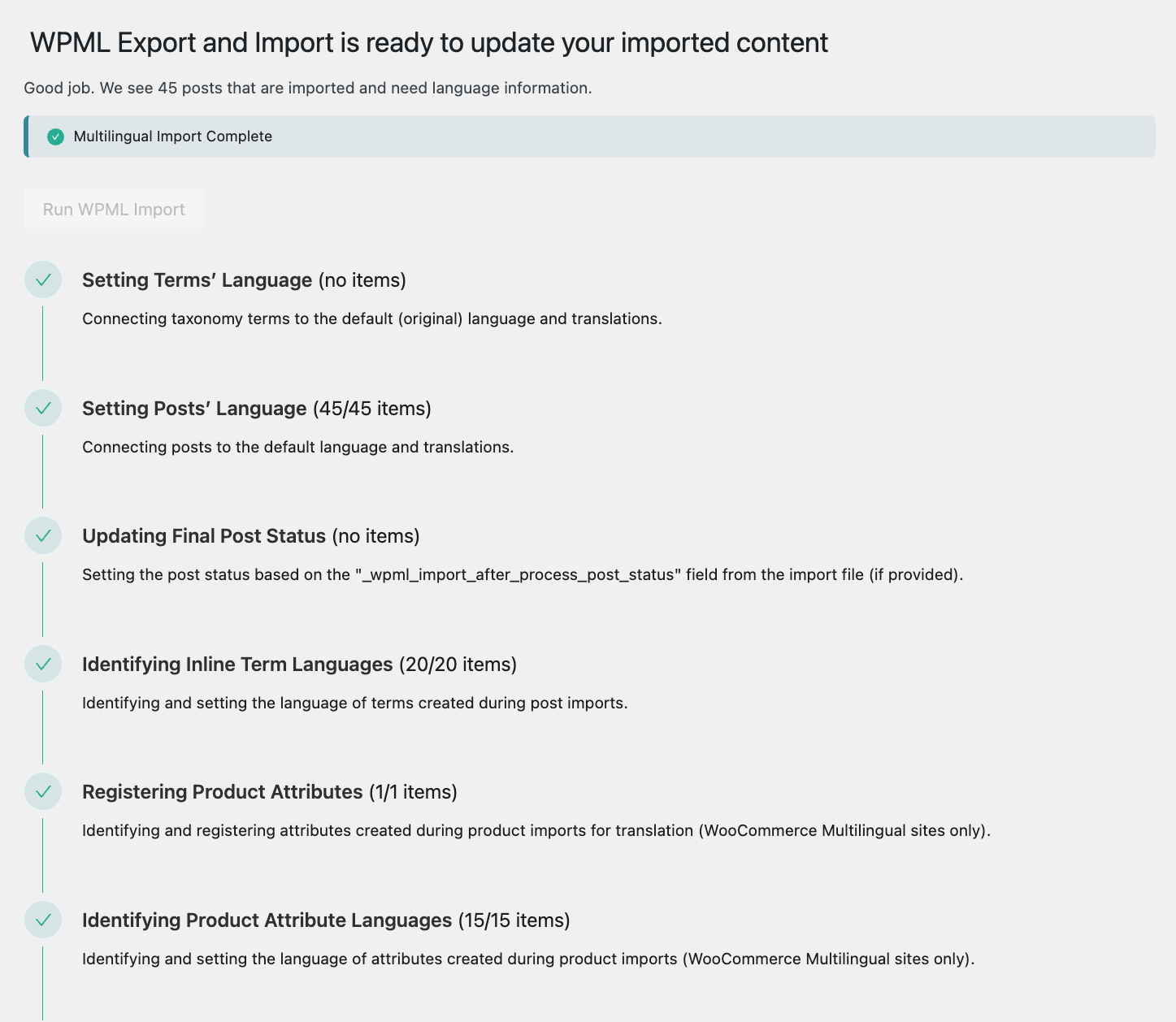
See the WPML Export and Import documentation for more details.
You and your team might manage multilingual information in spreadsheets and prefer to import these into a WordPress site. For such scenarios, you only need to add three language columns to your spreadsheet. These columns provide WPML Export and Import with the necessary language information to link your translations seamlessly.
After adding these columns, you can proceed with your usual import plugin. Once the import is complete, a single click lets WPML Export and Import update the language details.
To see how smoothly this process works, watch our video tutorial:
You can also learn more on the dedicated documentation page.
To get started with WPML Export and Import, go to your WPML Downloads page.
If you already have the alpha version WPML Export and Import installed on your site, you can update it directly from your site’s admin by going to Plugins → Add new and clicking over to the Commercial tab.
Which features of WPML Export and Import excite you the most? Which import and export plugin do you plan to pair it with?
Leave your thoughts, experiences, or any questions you might have in the comments section below!
Translate Options Pages directly in Translation Dashboard, manage local fields more easily, and enjoy faster performance with ACFML 2.2.0.
We’ve just released WPML Export and Import 1.1.0.
Managing your website’s translations just got a whole lot easier.