


WPML 5.0 Beta – A Redesigned Experience and Smarter Automatic Translation
WPML 5.0 is the biggest update we’ve shipped in years.

 3 minutes
We have heard your feedback and are excited to announce that we are integrating more automatic translation options with the Advanced Translation Editor. Google Translate is now a live option, and we are actively working on a DeepL integration as well.
Compared to the Advanced Translation Editor’s current automatic translation engine, Microsoft Azure, Google offers more language pair options.
For the most part, the translation quality is very similar, though Google and Microsoft may outshine each other in certain language pair combinations. We understand many clients already have a preferred engine in this regard. If you’re not sure which one is best for your language pair, we recommend sending a couple of pages for translation using each engine and reviewing the translations for your preference.
Before you create a translation job, go to WPML → Translation Management and click the Translation Tools tab. Click Settings and choose the engine from the dropdown menu.
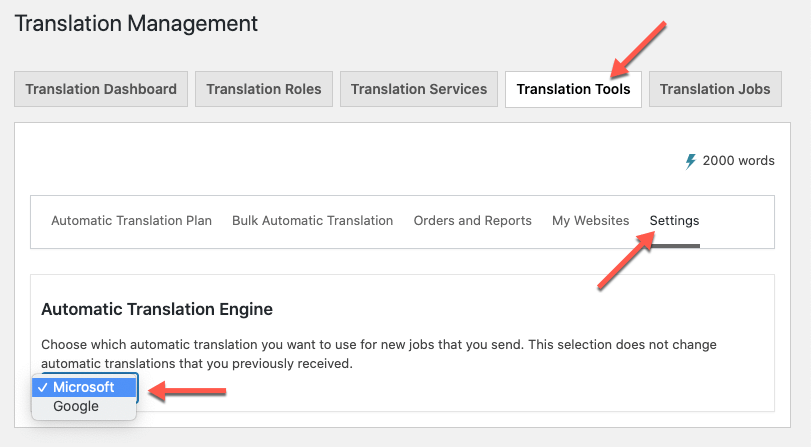
Some things to note about this feature:
Many of our clients have also requested an integration with DeepL. This integration is a bit more complicated, but rest assured our developers are actively working on it!
DeepL is now available as a way to power your automatic translations! Read more about the latest with WPML and DeepL.
It’s worth noting that Google and DeepL are more expensive to run compared to Microsoft. While the pricing for automatic translation using Microsoft and Google remains the same for clients for now, prices may increase to reflect these higher costs.
Do you have a preferred automatic translation engine? Let us know in the comments below!
WPML 5.0 is the biggest update we’ve shipped in years.
Translate Options Pages directly in Translation Dashboard, manage local fields more easily, and enjoy faster performance with ACFML 2.2.0.
Managing your website’s translations just got a whole lot easier.