- Status
- Resolved
- Resolved in
- 4.5.8
Overview of the issue
In some cases, you may see that your translations are stuck at Processing translation (could take a few minutes) status, even if they are translated to 100%.
If you go to WPML → Support → Advanced Translation Editor Error Logs, you will see an error such as:
The uploaded xliff file does not seem to be properly formed. Missing or wrong data: target.
And if you check the XLIFF file, you will see the target is empty: <![CDATA[]]>.
      <trans-unit extradata="et_pb_blurb: link_option_url" resname="package-string-148-5750" restype="string" datatype="html" id="package-string-148-5750">

        <source>

          <![CDATA[#]]>

        </source>

        <target state="needs-review-translation" state-qualifier="tm-suggestion">

          <![CDATA[]]>

        </target>

      </trans-unit>
Workaround
To solve this:
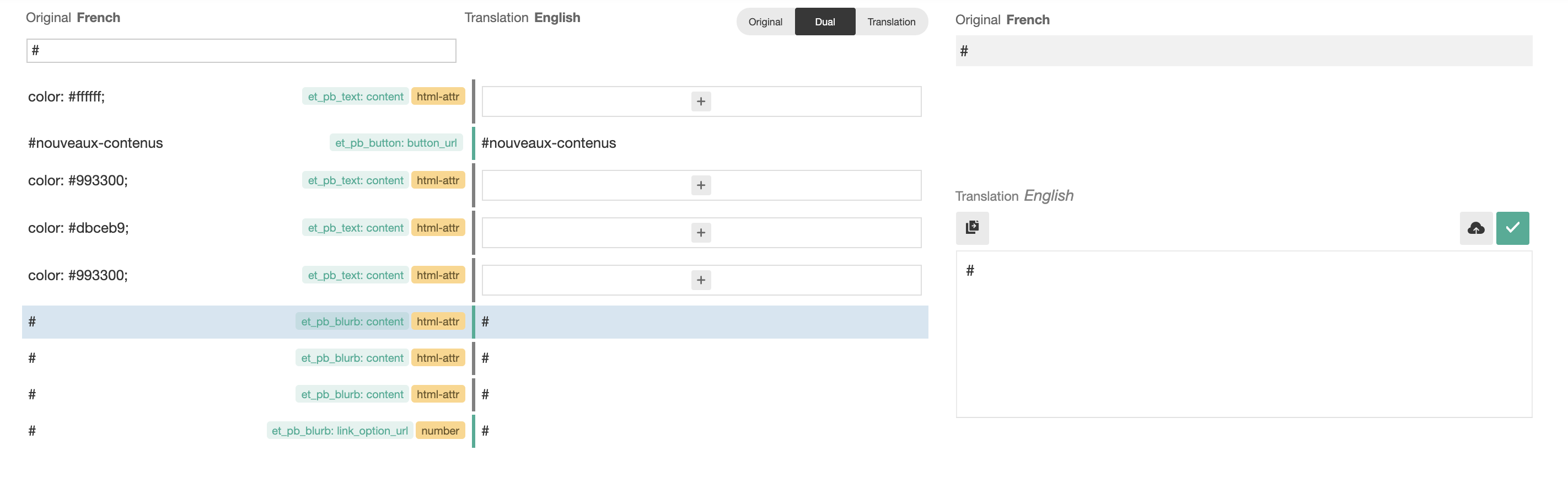
- Open your stuck translation in the Advanced Translation Editor.
- Search for # using the Search source box.
- Copy # to the missing translations and mark your translation as complete.